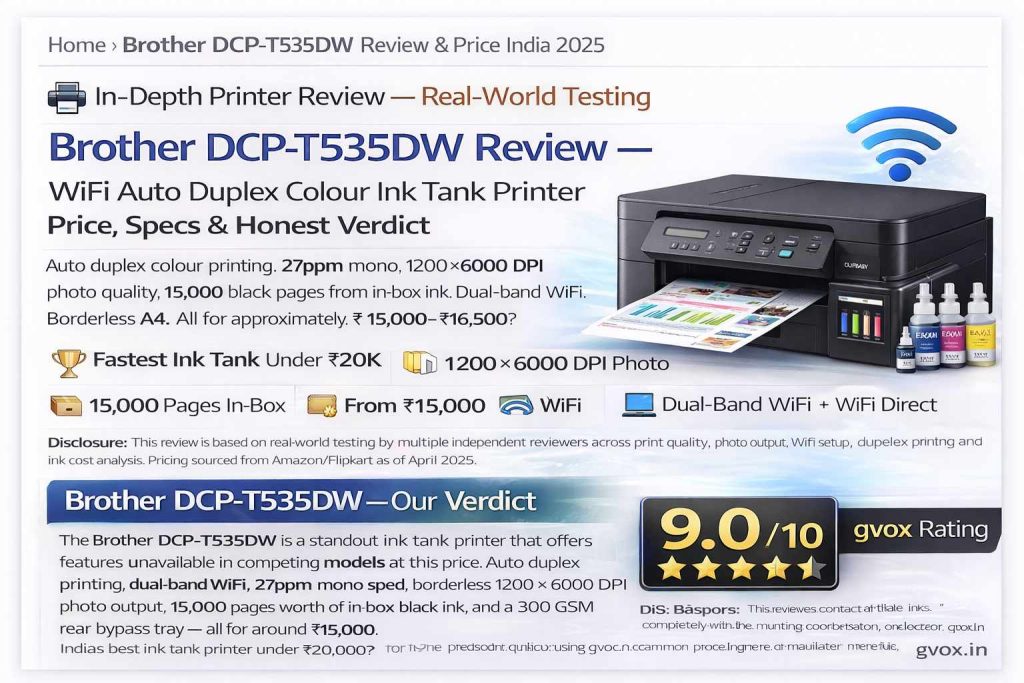
Brother DCP-T535DW — Our Verdict
The Brother DCP-T535DW is a standout ink tank printer that offers features unavailable in competing models at this price. Auto duplex printing, dual-band WiFi, 27ppm mono speed, borderless 1200×6000 DPI photo output, 15,000 pages worth of in-box black ink, and a 300 GSM rear bypass tray — all for around ₹15,000. The only notable weakness is colour print speed. For home, student, and small office use, this is the best value ink tank printer in India right now.
⚡ Quick Summary — Brother DCP-T535DW at a Glance
Type
Colour Ink Tank — Print, Scan, Copy
Print Speed
27 ppm Mono / 11 ppm Colour (Eco)
Resolution
1200 × 6000 DPI
Auto Duplex
✅ Yes — automatic 2-sided
WiFi
Dual-Band WiFi + WiFi Direct + AirPrint
In-Box Pages
15,000 Black + 5,000 Colour
The Brother DCP-T535DW is a purpose-built all-in-one printer for users who need affordable colour printing, two-sided documents, mobile printing, and professional photo output — all from a single compact device. It replaces the older DCP-525DW and launches in India in 2025 as Brother’s flagship budget ink tank model.
What’s in the Box
📦
DCP-T535DW — Complete Box Contents
15,000 Black Pages In-Box
Printer
Brother DCP-T535DW
Black Ink Bottles
2× BT-D100BK (15,000 pages total)
Colour Ink
1× each C / M / Y (5,000 colour pages)
Power Cable
Premium quality, included
USB Cable
USB Type-A to Type-B
Cleaning Kit
Paper pickup roller cleaning kit
Quick Setup Guide
Setup + safety guide
Warranty Card
1-year or 30,000 pages (first)
✅Best In-Box Ink Value in Its Class: Including 2 black bottles giving 15,000 pages is exceptional. Most competing brands include a single starter bottle or reduced-capacity bottles. With 5,000 colour pages also included, you can print extensively before needing to purchase refill ink — making the effective cost of ownership significantly lower from day one.
ℹ️New Ink Series — D100: The DCP-T535DW uses the new BT-D100 ink series — a change from the older BT6000/BT5000 bottles used in previous models. Make sure to purchase D100 series ink for refills, not the older series. Ink costs approximately ₹650 per black bottle (7,500 pages) and ₹500 per colour bottle (5,000 pages).
Design & Build Quality
🔧
Compact, Functional, Durable Build
7.2 kg | Tiltable Panel
Control Panel
Tiltable — 3 tilt positions
Display
1-line LCD (black & white)
Ink Visibility
External visible ink tanks
QR Code
Troubleshoot video access
The DCP-T535DW is a compact, well-built printer that looks premium despite its budget pricing. The tiltable control panel has three lock positions — you can set it at the angle that suits your desk height and workflow best. The one-line LCD display is simple but sufficient for all basic operations including WiFi setup, copy settings, scan mode, and ink level checks.
The visible external ink tanks are a practical design choice — you can check ink levels at a glance without opening any panels or navigating software menus. The unique shaped tank nozzles ensure the colour-coded bottles can only go into their correct tanks — even colour-blind users cannot accidentally mix up inks.
✅Energy Efficient: The DCP-T535DW has a low power consumption profile — suitable for use with an inverter for 2–3 hours easily. For students and home users in areas with frequent power cuts, this is a meaningful advantage.
Ink System & Cost Per Page
💧 World’s Most Affordable Printing — 1 Paisa Per Black Page
The ink tank system is what makes the DCP-T535DW so compelling for long-term ownership. Unlike cartridge printers where you pay ₹500–₹800 for a cartridge that prints 200–300 pages, one black ink bottle at ~₹650 prints 7,500 pages — that’s approximately 8–9 paise per black page. With duplex printing, the effective per-page cost drops even further since each sheet carries two pages of content.
For colour, three bottles (C+M+Y) at ~₹1,500 total print 5,000 colour pages — roughly 30 paise per colour page. This is dramatically lower than inkjet cartridge printers or even laser toner costs at the same quality level.
💧
Ink Bottles — Types, Yields & Cost
D100 Series — New 2025
BT-D100BK (Black)
7,500
pages per bottle
~₹650/bottle
BT5000C (Cyan)
5,000
pages per bottle
~₹500/bottle
BT5000M (Magenta)
5,000
pages per bottle
~₹500/bottle
BT5000Y (Yellow)
5,000
pages per bottle
~₹500/bottle
💡Refill Safety Technology: Each ink bottle has a unique shaped nozzle that physically only fits the correct colour tank. Black bottle fits only the black tank. Cyan, Magenta, Yellow bottles each fit only their respective tanks. You literally cannot put the wrong ink in the wrong tank — a practical design that prevents expensive mistakes.
ℹ️Ink Monitoring: The transparent external tank windows let you check remaining ink levels visually without any software. The LCD panel also displays ink warnings when levels are low, giving you advance notice to order replacements before running dry.
Print Quality — Text, Documents & Photos
🖨️
1200×6000 DPI — Professional Photo Output
Borderless A4 Supported
📄 Text & Document Quality
Text quality on plain A4 paper is exceptionally sharp. Fine text, small fonts (8pt and below), table lines, and document formatting all come out crisp and legible. The print quality approaches laser printer sharpness for black and white text documents — impressive for an ink tank printer.
For best text contrast, use glossy or inkjet-specific paper rather than standard plain paper. On plain paper the output is very good but not identical to laser. On glossy paper, text documents look near-identical to laser prints.
🎨 Colour Print Quality
Colour document printing delivers vibrant, accurate colours with well-reproduced gradients. In real-world testing of newspaper-style pages and infographics, colours are saturated without being garish, and fine detail text within colour documents remains readable even at small sizes.
📷 Photo Quality — Glossy & Photo Paper
Photo printing is where the DCP-T535DW genuinely impresses. At 1200×6000 DPI maximum resolution on Kodak Ultra Premium photo paper (270 GSM), the output is professional grade — sharp edges, smooth gradients, accurate skin tones, and gallery-quality results. The piezoelectric inkjet nozzle technology is more durable and less prone to clogging than thermal inkjet systems — a direct quality advantage over competing budget printers.
The printer supports borderless printing at A4 size — photos can be printed edge-to-edge without white borders. This is a premium feature rarely seen in budget ink tank printers.
✅Photo Studio at Home: The combination of 1200×6000 DPI resolution, borderless A4 printing, 300 GSM bypass tray, and piezoelectric nozzles effectively turns this into a home photo studio. Passport photos, A4 portraits, greeting cards, family photos — all printable at professional quality without leaving home.
Auto Duplex Printing
📋
Automatic Two-Sided Printing — India’s First at This Price
Unique Feature Under ₹20K
Auto duplex printing is the feature that most clearly separates the DCP-T535DW from its competitors. The printer prints one side, automatically retracts the paper, feeds it back through, and prints the reverse side — all without any manual intervention.
📄
Paper Saving
A 50-page document prints on just 25 physical sheets — 50% paper savings immediately applicable to all double-sided jobs.
💰
Cost Saving
At 15,000 in-box pages, duplex printing effectively doubles real-world content output — making it even cheaper per document page.
⚡
No Manual Flipping
No pausing, no flipping paper, no misprints from loading paper backwards. Fully automated from start to finish.
🏫
Student Notes
Multi-page study notes, worksheets, and exam papers all print two-sided automatically — ideal for school and college use.
💡Duplex Speed Reality: During duplex printing, effective speed drops roughly to 10 mono pages per minute (double-sided) and 3–4 colour pages per minute. This is expected and normal for all auto duplex printers — the speed trade-off is well worth the paper savings and convenience. Single-sided printing retains the full 27ppm mono speed.
⚠️Market Context: As of 2025, no other ink tank colour printer under ₹20,000 in India offers automatic duplex printing. Epson and Canon models in the same price range all require manual page flipping for two-sided prints. This single feature represents a significant practical advantage for the DCP-T535DW.
WiFi Setup & Mobile Printing
📶
Dual-Band WiFi + WiFi Direct + AirPrint
Multi-Device Wireless
WiFi Standard
Dual-Band WiFi (2.4GHz + 5GHz)
WiFi Direct
✅ Yes — no router needed
AirPrint
✅ Yes — iPhone/iPad direct print
Mopria
✅ Yes — Android standard
Mobile App
Brother Mobile Connect (iOS/Android)
Email Print
✅ Yes — print via email
📱 WiFi Setup Process
WiFi setup is quick and simple. Press and hold the WiFi button on the printer for 3–4 seconds until the screen shows the setup prompt. Download the Brother Mobile Connect app from Play Store or App Store. Tap Add Machine → Setup a New Machine → search for DCP-T535DW. Enter your WiFi password and the printer connects in seconds.
Multiple devices can connect to the same printer. Any phone, tablet, or laptop on the same WiFi network can install the Brother Mobile Connect app and add the printer as a connected machine — all devices print wirelessly without any additional setup.
🍎 AirPrint — No App Needed for Apple Users
iPhone and iPad users can print directly via AirPrint without installing any app. Open any document, image, or webpage → tap Share → tap Print → select the Brother DCP-T535DW. Done. No drivers, no software, no configuration required.
📧 Email Print
The web interface exposes an email-to-print feature — send an email to your printer’s unique address and it prints the attachment automatically. Useful for remote printing scenarios where you want to print a document from outside your home network.
✅WiFi Direct — Router Not Required: WiFi Direct allows your phone to connect to the printer directly without any router — useful in locations without internet access, at a client’s office, or in situations where the main router is unavailable. The printer acts as its own small WiFi access point for direct device connection.
Scanning & Copying
🔍
A4 Flatbed Scanner — High Quality Results
ID Copy Built-In
Scanner Type
A4 Flatbed CIS
Scan Output
PDF or Image (via app)
Scan to Phone
✅ Direct to smartphone/tablet
Scan to PC
✅ Direct scan-to-computer mode
ID Copy
✅ One-step front+back card copy
Scanner Lid
Liftable for thick books
The A4 flatbed scanner produces sharp, detailed scans. In Brother Mobile Connect app testing, zoomed-in scan samples showed fine text, serial numbers, and even small printed labels reproduced with full legibility. Scanned files save as high-quality image or PDF format and can be shared directly via WhatsApp, email, or cloud storage from within the app.
🪪 ID Copy Feature
The dedicated ID copy function is a practical addition for regular users. Place the front of your Aadhaar, PAN, driving licence, or any ID card on the scanner glass. Press the ID Copy button. The printer scans the front. Flip the card. Press again. The printer outputs both sides of the card on a single A4 sheet — in colour or black and white. Clean, quick, and no computer needed.
ℹ️Thick Book Scanning: The scanner lid lifts at an angle to accommodate thick books, spiral notebooks, and large bound documents. You can scan thick items without the lid cutting off the edges — a small but genuinely useful physical design feature.
Paper Trays & GSM Support
📂
Front Tray + Rear Bypass Tray — Dual Paper Handling
300 GSM Bypass — Unique
Front Tray Capacity
150 sheets (A4/Letter/Legal)
Front Tray GSM
Up to 180 GSM (standard use)
Output Tray
50 sheets capacity
Rear Bypass Tray
1-sheet manual feed slot
Bypass Tray GSM
Up to 300 GSM
Legal Size
✅ Supported (extendable tray)
The dual-tray system is a significant differentiator at this price point. The 150-sheet front tray handles all daily printing tasks — load once and print throughout the day. The rear manual bypass tray at the back is specifically designed for special media: glossy photo paper, envelopes, heavy card stock, and thick media up to 300 GSM.
Why is 300 GSM important? Premium photo paper like Kodak Ultra Premium tops out at 270 GSM. Having 300 GSM bypass support means every available quality of photo paper in the market is compatible — you never hit a GSM ceiling. Competing budget printers with only a bottom tray struggle with anything above 180 GSM, leading to paper pick-up failures with heavy media over time.
💡Pro Tip — Photo Paper Workflow: Always use the rear bypass tray for photo paper and specialty media — not the front tray. The bypass tray feeds paper through a straighter path with less mechanical pressure, ensuring clean feeding of thick or glossy sheets without jamming. The front tray is optimised for standard 75–100 GSM office paper.
ℹ️Paper Jam Access: If a paper jam occurs inside the printer, a rear panel can be opened to provide direct access to the stuck paper. This allows you to remove jammed sheets without tools or disassembly — a practical design feature that prevents paper tears and simplifies maintenance.
Print Speed Analysis
⚡
27 ppm Mono — Fastest Ink Tank in Category
Eco Mode vs Normal Mode
| Mode | Mono Speed | Colour Speed | Quality |
|---|
| Eco Mode | 27 ppm | 11 ppm | Normal (slightly lighter) |
| Normal Quality | 16 ppm | 9 ppm | Standard quality |
| Best / Photo | Slower | Slower | Maximum quality |
| Auto Duplex | ~10 ppm effective | ~3–4 ppm effective | Both sides |
Brother claims the DCP-T535DW is the fastest ink tank printer in its price range for mono printing — and the 27ppm eco mode figure is genuinely competitive against any alternative under ₹20,000. Real-world mono speeds closely match the claimed figures in standard office printing scenarios.
⚠️Colour Speed Limitation: At 11 ppm colour in eco mode and 9 ppm in normal mode, the DCP-T535DW is good but not the fastest for colour printing. If your primary use case is high-volume colour printing, the Brother DCP-T730DW (approximately ₹2,000–₹3,000 more) offers significantly faster colour speeds plus an auto document feeder. For balanced mono + colour use, the T535DW is the better value.
ℹ️Quiet Mode: The DCP-T535DW includes a Quiet Mode that reduces operating noise during printing. Useful in office environments, study rooms, or late-night printing sessions. There is a slight speed reduction in Quiet Mode, but for noise-sensitive environments it is a genuinely useful option.
Full Specifications — Complete Table
| Specification | Brother DCP-T535DW |
|---|
| Model | DCP-T535DW |
| Type | Colour Ink Tank — Print, Scan, Copy |
| Print Technology | Piezoelectric Inkjet |
| Max Resolution | 1200 × 6000 DPI |
| Mono Print Speed (Eco) | Up to 27 ppm |
| Colour Print Speed (Eco) | Up to 11 ppm |
| Mono Print Speed (Normal) | 16 ppm |
| Colour Print Speed (Normal) | 9 ppm |
| Auto Duplex | ✅ Yes — automatic |
| Borderless Print | ✅ Yes — up to A4 |
| Memory | 128 MB |
| Front Tray Capacity | 150 sheets |
| Front Tray Max GSM | 180 GSM |
| Rear Bypass Tray | 1-sheet manual feed |
| Bypass Tray Max GSM | 300 GSM |
| Output Tray | 50 sheets |
| Paper Sizes | A4, Letter, Legal, Photo, Envelope |
| Scanner Type | A4 Flatbed CIS |
| Scan to | PC, Phone, PDF, Image |
| ID Copy | ✅ Front + Back on single sheet |
| WiFi | Dual-Band (2.4GHz + 5GHz) |
| WiFi Direct | ✅ Yes — router-free printing |
| AirPrint | ✅ Yes — iPhone/iPad |
| Mopria | ✅ Yes — Android standard |
| Email Print | ✅ Yes |
| Mobile App | Brother Mobile Connect (iOS/Android) |
| USB Connection | USB Type-B port |
| Ink Type | D100 Series (new 2025) |
| Black Ink Yield (1 bottle) | 7,500 pages |
| Colour Ink Yield (1 bottle each) | 5,000 pages |
| In-Box Black Pages | 15,000 (2 bottles included) |
| In-Box Colour Pages | 5,000 (3 colour bottles) |
| Quiet Mode | ✅ Yes |
| Weight | 7.2 kg |
| Warranty | 1 year or 30,000 pages (first) |
| MRP | ₹18,290 |
| Market Price | ~₹15,000–₹16,500 (Amazon/Flipkart) |
T535DW vs T530DW — Which Should You Buy?
| Feature | DCP-T535DW | DCP-T530DW |
|---|
| Launch | India 2025 (new) | Older model |
| Black Ink (in-box) | 2 bottles = 15,000 pages | 1 bottle = 7,500 pages |
| Auto Duplex | ✅ Yes | ✅ Yes |
| WiFi | Dual-Band | Dual-Band |
| Print Speed | 27 mono / 11 colour ppm | Same |
| All other features | Identical | Identical |
| Price | ~₹16,500 | ~₹15,000 |
| Verdict | Better value (extra ink) | Good if cheaper |
💡Buy Decision: The only real difference is the extra black ink bottle in the T535DW. If the price gap between the two models is ₹1,000 or less — choose the T535DW. If the T530DW is more than ₹1,500 cheaper, the savings justify the missing extra bottle since black refill bottles cost only ~₹650 to buy separately.
Price & Where to Buy
💰 Brother DCP-T535DW — India Pricing (April 2025)
Brother DCP-T535DW (Standard)
Amazon / Flipkart Online
MRP ₹18,290
~₹15,000–₹16,500
Sale Price
With Bank Card Discount (₹1,000–₹1,500)
HDFC / ICICI / Axis offers
~₹14,000–₹15,000
Best Effective Price
Brother Authorised Dealer (Offline)
Local stores across India
✅Buying Tip: Check Amazon and Flipkart during sale events (Big Billion Days, Great Indian Festival, Prime Day) for additional ₹1,000–₹2,000 off. Bank card discounts are often available year-round. Verify the seller rating and check for manufacturer warranty inclusion before purchasing. Manufacturing date should not be more than 6 months old ideally.
💬 Honest Opinion — After Real-World Testing
The Brother DCP-T535DW is the most complete ink tank printer available in India under ₹20,000 in 2025. It delivers features that no competing model at this price point offers — auto duplex printing, dual-band WiFi, 300 GSM photo paper support, borderless A4 printing, and 15,000 in-box black pages. Every single one of these features adds real value to daily use.
The print quality genuinely surprised reviewers. On glossy photo paper at 1200×6000 DPI, the results are professional grade — comparable to what a professional photo lab would produce. The piezoelectric nozzle technology is technically superior to thermal inkjet for durability and longevity. Brother has built a print head that will outlast the machine’s typical usage life.
The cost of ownership is exceptionally low. A black bottle at ~₹650 prints 7,500 pages. If you print 500 pages per month, that’s one bottle every 15 months — roughly ₹43 per month for black printing. This is dramatically cheaper than any cartridge printer and competitive with laser printers at this quality level.
The one area where it falls short is colour print speed — 11 ppm in eco mode is adequate for home and small office use, but high-volume colour print shops would need the faster T730DW model. For typical household and small business use, the T535DW is the clear winner on value.
🎯 Final Verdict — Who Should Buy Brother DCP-T535DW?
✅
Students: Print notes, assignments, and worksheets both sides automatically. 15,000 pages of black ink in-box means months of printing without spending a rupee on refills.✅
Home Users: Family photos in studio quality, Aadhaar/PAN ID copies, school circulars, recipes — all covered. Wireless from any phone or tablet.✅
Small Office (1–5 users): Low cost-per-page, auto duplex saves paper costs, dual-band WiFi connects all office devices simultaneously. Best ROI in the category.✅
Photography Enthusiasts: 1200×6000 DPI + borderless A4 + 300 GSM bypass = professional photo prints at home. No need for lab visits for standard sizes.✅
Inverter/Power Cut Areas: Low power consumption makes it suitable for running on home inverters — practical for semi-urban and rural areas with intermittent power.🤔
High-Volume Colour Users: If you print 200+ colour pages per day, consider the Brother T730DW — faster colour ppm and auto document feeder for ₹2,000–₹3,000 more.❌
Laser-Only Text Users: If you exclusively print black text documents in very high volumes (1,000+ pages/day), a dedicated mono laser printer will be faster and cheaper per page at scale.👑
The one-line verdict: Brother DCP-T535DW is India’s best value all-in-one colour ink tank printer under ₹20,000 in 2025 — no competition.
Frequently Asked Questions (FAQ)
What is the price of Brother DCP-T535DW in India?
The Brother DCP-T535DW is listed at MRP ₹18,290 and available on Amazon/Flipkart for approximately ₹15,000–₹16,500. With bank card discounts of ₹1,000–₹1,500, effective price can reach ~₹14,000. Also available from authorised Brother dealers at ₹15,500–₹17,000.
How many pages does Brother DCP-T535DW print with included ink?
The box includes 2 black bottles = 15,000 black pages and 3 colour bottles (C+M+Y) = 5,000 colour pages. This is the highest in-box ink yield in the ink tank printer category under ₹20,000.
What is the print speed of Brother DCP-T535DW?
In Eco Mode: up to 27 ppm mono and up to 11 ppm colour. In Normal quality: 16 ppm mono and 9 ppm colour. Brother claims this is the fastest ink tank printer in its price range for mono printing.
Does Brother DCP-T535DW support auto duplex printing?
Yes. Automatic two-sided printing is built in — the printer prints one side, retracts the paper, and prints the other side without manual intervention. No other colour ink tank printer under ₹20,000 in India offers auto duplex printing.
How to connect Brother DCP-T535DW to WiFi?
Press and hold the WiFi button for 3–4 seconds. Download the Brother Mobile Connect app (Play Store / App Store). Tap Add Machine → Setup a New Machine → search DCP-T535DW → enter WiFi password → done. iPhone users can also use AirPrint without any app.
Can Brother DCP-T535DW print photos?
Yes — professional quality. At 1200×6000 DPI on glossy photo paper up to 300 GSM, photo output is sharp, vibrant, and professional grade. Borderless A4 printing is supported. Kodak Ultra Premium photo paper (270 GSM) tested — results were excellent.
What ink does Brother DCP-T535DW use?
The DCP-T535DW uses the new D100 series ink — BT-D100BK for black (~₹650, 7,500 pages) and BT5000C/M/Y for colours (~₹500 each, 5,000 pages). Unique shaped nozzles prevent wrong colour filling accidentally.
What is the difference between Brother DCP-T535DW and DCP-T530DW?
Features are identical — same auto duplex, WiFi, speed, and build. The only difference: T535DW includes 2 black ink bottles (15,000 pages) vs T530DW’s 1 bottle (7,500 pages). T535DW costs ~₹1,000–₹2,000 more. If the price gap is under ₹1,500, choose the T535DW.
Is Brother DCP-T535DW good for home and office use?
Excellent for both. Low cost-per-page (~₹0.09 per black page), auto duplex saves paper, WiFi enables everyone to print wirelessly, and the 150-sheet tray handles daily office volumes. Warranty covers 1 year or 30,000 pages.
What is the warranty on Brother DCP-T535DW?
1 year or 30,000 pages — whichever comes first. Service and warranty support available through Brother’s authorised service centres across India. Check for your nearest Brother service centre via the Brother India official website.
Does Brother DCP-T535DW work with mobile phones?
Yes — with any smartphone. Android phones use the Brother Mobile Connect app or Mopria print service. iPhone/iPad users print directly via AirPrint without installing anything. Email print is also supported for remote printing via any device.
🌐 Official Website: Gvox.in →
📌 Sources: This review synthesises real-world testing from multiple independent reviewers covering print quality (text, colour, photo), auto duplex operation, WiFi setup on Android and iOS, ID copy function, scanner quality testing, bypass tray GSM verification, and ink cost calculations. Pricing verified on Amazon/Flipkart as of April 2025. Technical specifications verified from Brother India official product page.
For more printer reviews and tech guides, visit Gvox.in.