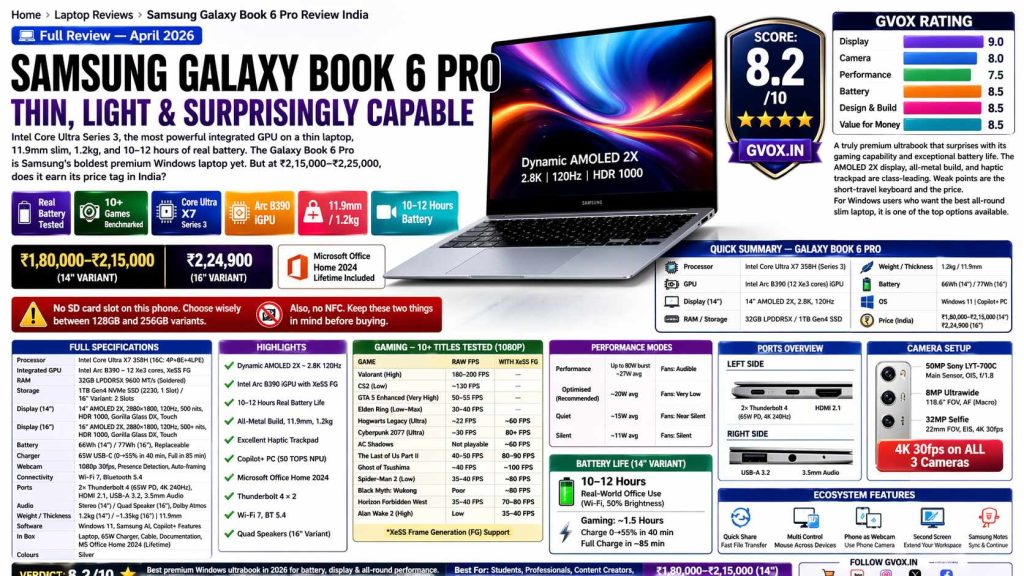
Samsung Galaxy Book 6 Pro — Thin, Light & Surprisingly Capable
Intel Core Ultra Series 3, the most powerful integrated GPU on a thin laptop, 11.9mm slim, 1.2kg, and 10–12 hours of real battery. The Galaxy Book 6 Pro is Samsung’s boldest premium Windows laptop yet. But at ₹2,15,000–₹2,25,000, does it earn its price tag in India?
📋 Quick Summary — Samsung Galaxy Book 6 Pro India
The Galaxy Book 6 Pro arrives with Intel’s latest Panther Lake-based Core Ultra Series 3 processor — the first significant leap in integrated GPU performance that makes gaming on a slim Windows laptop genuinely viable. With XeSS Frame Generation support baked into the Arc B390 GPU, the Book 6 Pro can push playable framerates in a wide range of titles, something no previous Intel iGPU could claim. Combined with Samsung’s best-ever AMOLED display, an excellent haptic trackpad, and real-world battery that outlasts most premium Windows competition, this is a compelling machine — especially if you are already in the Samsung ecosystem.
📑 Table of Contents
01. Design & Build Quality
The Galaxy Book 6 Pro is one of the few Windows laptops that genuinely makes you reach for it with the same instinctive joy as a MacBook. The all-metal aluminum chassis weighs just 1.2kg (1.45kg with charger) and measures only 11.9mm thin — thinner than most smartphones. Samsung has refined the edges from last year’s model with slightly more curved lines, giving it a more organic, premium feel in hand. The brushed metal finish hides fingerprints decently and carries a subtle visual depth that plain plastic could never replicate.
Build rigidity is excellent — lid flex and keyboard deck flex are both minimal despite the ultra-slim chassis. The hinge is appropriately stiff for touchscreen use without screen wobble in normal typing conditions. A small notch at the bottom of the lid allows single-hand opening, a thoughtful detail that works every time. The laptop opens to a maximum of 120 degrees, sufficient for touch use comfort. The two-tone interior (darker keyboard deck vs. silver lid) is a design choice that has divided opinion — some find it distinctive, others prefer all-silver cohesion. It is a subjective call either way, but the quality of materials is beyond question.
🔑 Key Design Specs
02. Full Technical Specifications
03. Display — Dynamic AMOLED 2x
Samsung builds some of the best mobile displays in the world, and the Galaxy Book 6 Pro benefits directly from that expertise. Both the 14-inch and 16-inch variants share the same panel specifications — 2880×1800 (2.8K) resolution on a Dynamic AMOLED 2x panel with 120Hz adaptive refresh rate (30–120Hz dynamic range). The 2.8K resolution is genuinely striking, particularly on the 14-inch where pixel density is high enough that individual pixels are completely invisible even at close range. Text, photos, and HDR content all look exceptional.
The display hits 500 nits in standard mode and up to 1000 nits peak in HDR content windows (VESA DisplayHDR 1000 certified). For an ultrabook-class laptop, this HDR performance is rare and makes video content on supported streaming platforms look dramatically better. Colour gamut covers 100% sRGB and 100% DCI-P3, and Samsung includes multiple colour profile options — Natural, Vivid, and calibrated professional modes. The anti-reflective Gorilla Glass DX coating reduces reflections enough for comfortable outdoor use. Vision Booster dynamically adjusts contrast and saturation based on ambient lighting — a thoughtful real-world feature.
04. Keyboard, Trackpad & Ports
Keyboard — The Weak Link
The keyboard is the most significant usability compromise on the Galaxy Book 6 Pro. Key travel measures 1.2mm — short even by ultrabook standards — and the feel is slightly mushy with limited tactile feedback. Touch typists in particular may find themselves making more errors than usual while adapting to this keyboard. The arrow keys are notably cramped and undersized, which leads to occasional mispresses. The backlight is functional but not particularly bright. The layout itself is standard and includes function keys with useful shortcuts, plus a dedicated Copilot key.
Trackpad — Best on Any Windows Laptop
The trackpad is outstanding — a large haptic feedback trackpad with no physical mechanical mechanism. Instead, a haptic motor beneath the surface provides consistent click feedback anywhere you press, from corner to corner. This is a genuine premium differentiator — most Windows laptop trackpads still use physical click mechanisms that feel inconsistent. The Galaxy Book 6 Pro’s haptic trackpad is smooth, accurate, and palm rejection works flawlessly. Multi-gesture support is comprehensive and reliable.
Ports
05. CPU, AI & Creative Benchmarks
The Intel Core Ultra Series 3 X7 358H is Intel’s latest Panther Lake processor — more power-efficient than previous generations while delivering meaningful single-core improvements. The 16-core configuration (4 P-cores, 8 E-cores, 4 LP E-cores) with Intel Thread Director intelligently assigns tasks across core types to balance performance and efficiency. For everyday use — web browsing, office work, code compilation, multi-tab work — performance is completely seamless with no lag perceptible.
| Benchmark | Score | Note |
|---|---|---|
| Cinebench R23 Multi-Core | Good — similar on battery & charging | Slightly better on battery in multi-core |
| Cinebench 2024 | Competitive — Series 3 single-core improved | Strong vs. prior-gen thin-light laptops |
| Geekbench 6 | ~19,000–20,000 multi / ~3,300 single | Similar performance on battery & plugged in |
| Blender BMW Render | 22 sec (battery) / 35 sec (plugged in) | Lower is better — battery slightly faster |
| Puget Bench — Photoshop | Good for thin-light | Multi-layer thumbnail work handled smoothly |
| Puget Bench — Premiere Pro | Good for 4–5 layer timelines | Complex exports need more time |
| PCMark 10 | Top tier for thin-light | Daily productivity excellent |
| DeepSeek R1 32B (LM Studio) | ~6 min 10 sec | Full local AI inference |
| DeepSeek R1 8B (LM Studio) | ~1 min 33 sec | Good for quick local AI tasks |
| Qwen Coder 30B | ~33 sec output | Practical coding AI model |
For creative tasks, multi-layer Photoshop projects and 4–5 layer Premiere Pro timelines work without issue. Intermediate After Effects work runs fine; heavy motion graphics requiring dedicated GPU will need the Galaxy Book 6 Pro Ultra (separate model with Nvidia GPU). Music production software runs excellently as DAWs are CPU-intensive. 3D modelling at an intermediate level is viable.
06. Gaming Performance — Arc B390 iGPU + XeSS Frame Generation
The Intel Arc B390 integrated GPU is the most significant leap in iGPU gaming performance on a Windows thin-and-light laptop to date. With 12 Xe3 cores, 12 RT units, and support for XeSS Frame Generation (Intel’s equivalent of Nvidia’s DLSS Frame Generation), the Arc B390 can produce playable framerates in titles that previous Intel iGPUs couldn’t render at all. The power draw during gaming is remarkably low — Valorant, for instance, runs at only 20–23W total — meaning the laptop stays cool and quiet even during extended gaming sessions.
All tests conducted at 1080p resolution, full charge. XeSS Frame Generation boosts are shown where applicable:
Competitive & Light Titles
Open World & Story Games
Demanding Titles — XeSS Frame Generation
07. Thermals & Performance Modes
Under a 1-hour Prime95 CPU stress test, the Core Ultra X7 358H peaked at 95°C with an average of 80°C. Average sustained power draw was 27W, with a brief burst to 68W at load start. Clock speeds averaged around 2.03GHz sustained with a boost peak to 4.5GHz. Remarkably, even at these temperatures, the fan noise remained genuinely low — inaudible at conversational distance in most scenarios.
Optimised mode is the recommended daily driver — performance drops only minimally compared to Performance mode, but fan noise becomes nearly imperceptible. For light daily work such as browsing, office apps, and video calls, Silent mode works perfectly and the laptop runs entirely fanless. The thermal management on this machine is genuinely impressive for a chassis this thin.
08. Battery Life & Charging
Battery life is one of the Galaxy Book 6 Pro’s strongest selling points. In real-world office testing — 50% screen brightness, keyboard backlight off, continuous office work, YouTube music in background, multiple applications open, internet connected — the 14-inch model delivered 10–12 hours of continuous use. Samsung claims up to 30 hours video playback, which reflects a controlled test, but the real-world numbers are still exceptional by Windows laptop standards. The Intel Core Ultra Series 3 processor’s power efficiency is the primary reason — the LP E-cores handle background tasks at minimal wattage, preserving battery for active workloads.
09. Samsung Ecosystem, AI Features & Webcam
Samsung AI Features
With 50 TOPS NPU (Copilot+ certified), the Galaxy Book 6 Pro unlocks Windows 11’s full Copilot+ feature set. Live Captions with 21-language translation support works reliably and is genuinely useful in multi-language meetings. Click to Do (Windows key hold) provides instant contextual actions — copy, summarise, translate, visual search — on any on-screen content without opening a separate app. AI Recall builds a visual searchable history of everything done on the laptop. Samsung-specific additions include AI Cut Out (extract subjects from images with a circle gesture), instant translation via Samsung Select, and Samsung Copilot integration.
Galaxy Ecosystem Features
If you use a Samsung Galaxy phone, the Book 6 Pro becomes significantly more useful. Your Galaxy phone can function as an enhanced webcam. Multi Control lets you drag your mouse across from phone to laptop screen and vice versa — moving files, sharing clipboard content, and launching apps across devices. Quick Share (Samsung’s AirDrop equivalent) makes wireless file transfer seamless. Storage Sense syncs selected content across devices. Samsung Flow lets you control your phone from the laptop screen with full mirroring — useful for replying to messages without picking up your phone.
Webcam
The 1080p 30fps webcam is adequate — skin tones and detail are decent in good lighting but can appear slightly grainy in lower ambient light. For a ₹2-lakh-plus laptop, a 1440p sensor would be expected. The software features compensate somewhat: auto-framing keeps you centered when moving, eye contact correction subtly adjusts gaze direction for more natural video calls, and portrait blur produces professional-looking background separation. Presence detection automatically locks the screen when you walk away and wakes it when you return — a genuinely useful security convenience.
10. Final Verdict
🏁 Final Verdict — Samsung Galaxy Book 6 Pro India
The Samsung Galaxy Book 6 Pro is the best premium thin-and-light Windows laptop Samsung has made. It earns that title through its exceptional AMOLED 2x display, the best haptic trackpad on any Windows laptop, genuinely surprising gaming capability via Arc B390 and XeSS Frame Generation, category-leading real-world battery life of 10–12 hours, and an ultra-premium build at 11.9mm and 1.2kg. For working professionals, content consumers, and students who want Windows, this laptop checks nearly every box.
The compromises are real but manageable. The keyboard is the main usability weakness — short travel and mushiness will frustrate heavy typists. The removal of the SD card reader from this generation is a genuine step backward. And at ₹2,15,000 for the 14-inch top config, it faces uncomfortable competition — the MacBook Air M5 is cheaper with better CPU/GPU performance, and the Yoga Slim 7i Ultra competes closely at a similar price on Windows. The Galaxy Book 6 Pro’s main advantages over these are its AMOLED display quality and Samsung ecosystem integration, which are genuinely meaningful if you live in that world.
If you are a Samsung Galaxy user who wants the best Windows laptop experience, this is your machine without question. If you are brand-agnostic and prioritise raw performance per rupee, explore alternatives before committing.
✅ Pros
World-class Dynamic AMOLED 2x display — 2.8K, 120Hz, 1000-nit HDR, 100% P3. Best screen on a Windows ultrabook.
Arc B390 iGPU with XeSS Frame Generation — gaming on a thin laptop is no longer a joke. 10+ demanding titles playable.
10–12 hours real-world battery — among the best for Windows thin-and-lights. Consistent on battery and plugged in.
Haptic trackpad — the best on any Windows laptop, period. Consistent feedback everywhere, no palm rejection issues.
Full aluminum build, 11.9mm, 1.2kg — premium in hand, premium on desk, and light enough for daily carry.
MS Office Home 2024 lifetime licence included — meaningful value addition at this price.
Presence detection, auto-framing webcam, Samsung ecosystem integration — thoughtful productivity features throughout.
❌ Cons
Keyboard is a real weakness — 1.2mm travel feels mushy and low. Heavy typists will notice increased error rate.
No SD card reader — removed from this generation despite being present last year. Needs a dock for photographers.
RAM is soldered — 32GB cannot be upgraded later. Plan accordingly before purchasing.
No charging port on right side — both Thunderbolt 4 ports are on the left. Can be inconvenient depending on desk setup.
PWM flickering detected on display — sensitive users may experience discomfort during extended sessions.
Price is steep — at ₹2,15,000, it competes with MacBook Air M5 which offers better raw performance for less money.