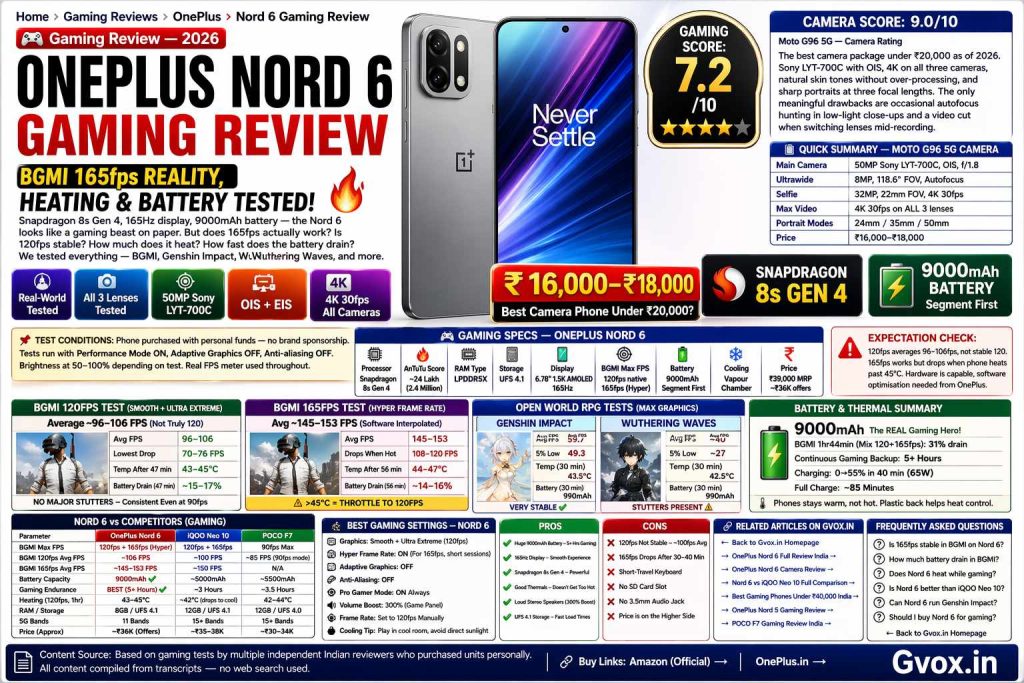
OnePlus Nord 6 Gaming Review — BGMI 165fps Reality, Heating & Battery
Snapdragon 8s Gen 4, 165Hz display, 9000mAh battery — the Nord 6 looks like a gaming beast on paper. But does 165fps actually work? Is 120fps stable? How much does it heat? How fast does the battery drain? We tested everything — BGMI, Genshin Impact, Wuthering Waves, and more.
🎮 Gaming Specs — OnePlus Nord 6
The Nord 6 runs BGMI at Smooth + Ultra Extreme (120fps native). Hyper Frame Rate enables 165fps mode via software interpolation. Game panel allows Pro Gamer Mode, 300% volume boost, FPS meter, and per-app performance settings.
BGMI 120fps Test — Real Numbers
The OnePlus Nord 6 unlocks Smooth + Ultra Extreme graphics in BGMI — which is the 120fps tier. However, across multiple sessions tested by different reviewers who purchased their own units, the phone does not maintain a stable 120fps. Real-world average across TDM and Erangel maps falls between 96 and 106fps.
In TDM (Team Deathmatch) — the lightest load — the phone performs best, hovering near 110–115fps in open areas. As soon as fights intensify, frames drop to 90–96fps. On Erangel (the most demanding classic map), FPS frequently hovers between 80–100fps, with drops to 70–76fps near Pochinki or in heavy combat zones.
One positive: there are no major stutters visually. Even when the FPS meter shows 90fps, gameplay feels smooth because frame delivery is consistent — the drops are gradual, not sudden spikes. Opponents are taken down without significant lag or input delay in most sessions.
Pro Gamer Mode is available via the game panel (left swipe while in-game). With this enabled, calls and notifications are blocked, volume can be boosted to 300%, and the phone maintains slightly better thermal performance. Keep Pro Gamer Mode ON always.
BGMI 165fps — Hyper Frame Rate Reality
The 165fps mode in BGMI on Nord 6 is enabled via Hyper Frame Rate — a software-based frame interpolation feature, NOT native 165fps rendering. This distinction matters: the game engine still renders at its native rate, and the phone’s display processor inserts interpolated frames to reach 165fps.
When it works, 165fps mode feels noticeably smoother than 120fps. Screen transitions, aiming, and movement feel more fluid. In lighter areas of the map, FPS can touch 165–170fps on the meter. Average across a full Erangel match is 145–153fps.
For competitive BGMI players, 165fps mode is useful but the inconsistency can be distracting. If you’re a rank-push player who needs consistent high FPS, 120fps mode is more reliable even if the average is lower — at least the drops are predictable.
If you play more casually — enjoying the smoothness in normal gameplay — 165fps mode is genuinely fun and the visual improvement over 120fps is noticeable on the 165Hz display.
Note: Flagship OnePlus phones (15R, 15) handle 165fps more consistently because of better thermal management. The Nord 6 brings flagship display features to mid-range, but the thermals don’t quite match up for sustained 165fps.
Heating & Thermal Test
The Nord 6 has a vapour chamber cooling system. In normal BGMI gameplay (120fps, 47 minutes), the phone peaks at 41–45°C. In 165fps mode (56 minutes), it reaches 44–47°C. These temperatures are warm but not dangerously hot.
In Wuthering Waves at max graphics (30 minutes), the rear panel reaches 42.5°C. In Genshin Impact at max graphics (30 minutes), the phone reaches 43.5°C on both front and rear panels. An IR thermal camera shows heat concentrated in the centre of the phone — exactly where the SoC sits — which is normal vapour chamber behaviour.
🌡️ Temperature Summary by Game/Mode
The plastic back panel of the Nord 6 is actually a hidden advantage for heat dissipation perception — plastic does not conduct heat to your hands as efficiently as glass or metal, so the phone feels less hot in-hand than the thermometer reading suggests. This is the same reason many gaming-focused phones use plastic backs.
Battery Drain — Gaming Endurance
The 9000mAh battery is genuinely exceptional for gaming. In a combined 120fps + 165fps BGMI session lasting 1 hour 44 minutes, the total battery drain was approximately 31% from 100%. That means you can game for roughly 5+ hours on a single charge — far more than any competitor with 4000–5000mAh batteries.
Even in demanding games like Wuthering Waves and Genshin Impact — which consumed 990mAh per 30-minute session — the 9000mAh cell gives you ~4.5 hours of open-world RPG gaming on a single charge. Competitors like the OnePlus 15R consumed only 750mAh in the same Genshin session (more efficient chip tuning), but they start with much smaller batteries.
Genshin Impact & Wuthering Waves
BGMI (30 fps in Classic mode) and Grid Legends
Grid Legends — a racing game with realistic light reflections and detailed environments — runs at a stable 30fps throughout. Average FPS was 30.1fps with 5% low at 29fps — essentially locked 30fps. Battery consumption was only 810mAh in ~30 minutes, less than OnePlus 15R’s 825mAh in the same test. The Nord 6 handled this game efficiently.
Wuthering Waves (Max Settings)
Wuthering Waves at maximum graphics settings (60fps target) shows the Nord 6’s limits. FPS frequently dropped from 60fps to 40fps average during exploration and combat. Frame stability was inconsistent — large gaps between highest and lowest FPS indicated visible micro-stutters in some sequences. Battery consumption was higher at 990mAh per 30 minutes. Temperature hit 42.5°C on the rear panel.
Visually, the game ran playably but not smoothly at all times. Players who prioritise smooth open-world RPG performance should lower graphics settings from maximum.
Genshin Impact (Max Settings)
The Nord 6’s best performance in this test was in Genshin Impact at max graphics. Average FPS: 59.7fps with 5% low at 49.3fps — the gap between these two numbers is small, meaning frame delivery was consistent and stable. Genshin Impact ran excellently on the Nord 6, maintaining near-60fps throughout story, puzzle, and combat sections.
Battery consumption mirrored Wuthering Waves at 990mAh per 30 minutes, and temperature peaked at 43.5°C on both panels. For Genshin Impact players, the Nord 6 is an excellent choice.
Nord 6 vs iQOO Neo 10 vs POCO F7 Gaming
All three phones — OnePlus Nord 6, iQOO Neo 10, and POCO F7 — use the Snapdragon 8s Gen 4 processor. Yet gaming results differ significantly due to different software tuning, cooling, and display setups.
| Parameter | OnePlus Nord 6 | iQOO Neo 10 | POCO F7 |
|---|---|---|---|
| AnTuTu Score | ~24 Lakh | ~24.5 Lakh ✅ | ~23 Lakh |
| BGMI Max FPS Unlocked | 120fps + 165fps (Hyper) | 120fps + 165fps | 90fps max ❌ |
| BGMI 120fps Avg FPS | ~106fps ✅ | ~100fps | ~85fps (90fps mode) |
| BGMI 165fps Avg FPS | ~145–153fps | ~150fps | N/A |
| 4K Video Export (VN App) | Slowest (30s extra) | 14% faster ✅ | 10% faster |
| Display Brightness | Slightly dimmer outdoor | Brightest ✅ | Good (2nd) |
| Speaker Loudness | Loudest (300% boost) ✅ | 2nd (loud, less bass) | Balanced, less loud |
| Battery Capacity | 9000mAh ✅ | ~5000mAh | ~5500mAh |
| Gaming Endurance | Best (5+ hrs BGMI) ✅ | ~3 hrs | ~3.5 hrs |
| Heating (120fps, 1hr) | 43–45°C | ~42°C (drops FPS to cool) | 42–44°C |
| 5G Bands | 11 bands | 15+ bands ✅ | 15+ bands ✅ |
| RAM | 8GB only | 12GB ✅ | 12GB ✅ |
| Price (Approx) | ~₹36K (after offers) | ~₹35–38K | ~₹30–34K |
Best Gaming Settings for Nord 6
🏁 Final Gaming Verdict — OnePlus Nord 6
The OnePlus Nord 6 scores 7.2/10 for gaming. It is a good gaming phone — particularly for casual to moderate BGMI players and open-world RPG gamers who also care about battery life. The 9000mAh battery is genuinely unmatched in this price range and gives you 5+ hours of continuous BGMI on one charge.
However, if raw FPS consistency is your priority, the Nord 6 will disappoint slightly. 120fps mode averages 96–106fps, not stable 120. 165fps mode is fun but throttles when the phone heats past 45°C. The iQOO Neo 10 is a tighter gaming performer. POCO F7 offers better value if 90fps BGMI is sufficient.
Buy the Nord 6 for gaming if: You want the best gaming battery life in this budget, you play casual to moderate BGMI, you enjoy Genshin Impact (which runs excellently at 60fps), and you want the 165fps display experience with the expectation it fluctuates. Avoid if 120fps stable consistency is non-negotiable.
🔗 Related on Gvox
Frequently Asked Questions
Source link=https://www.oneplus.in/nord-6 and https://www.oneplus.in/oneplus-nord-6