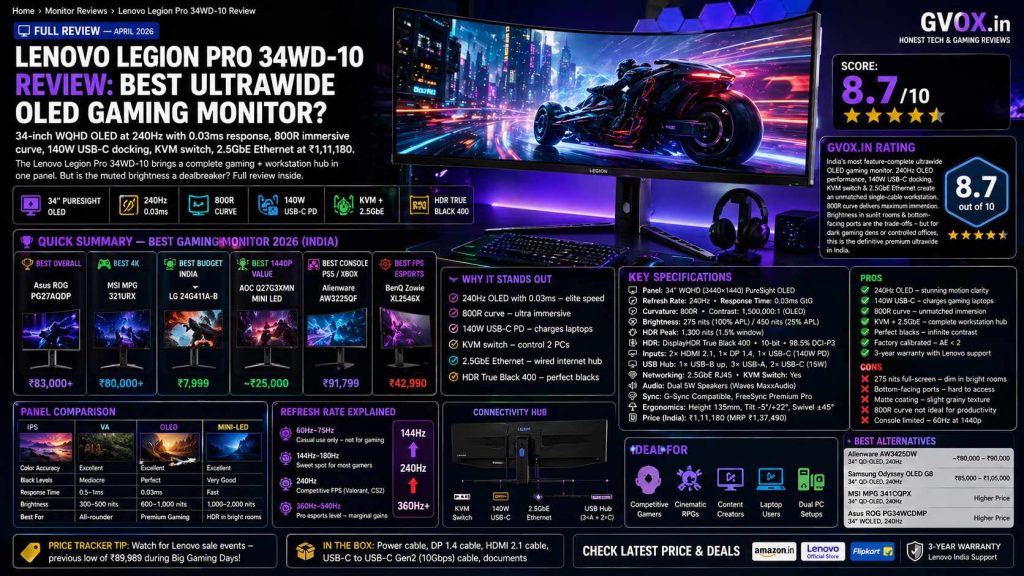
Lenovo Legion Pro 34WD-10 Review: Best Ultrawide OLED Gaming Monitor?
34-inch WQHD OLED at 240Hz with 0.03ms response, 800R immersive curve, 140W USB-C docking, KVM switch, and 2.5GbE Ethernet at ₹1,11,180. The Lenovo Legion Pro 34WD-10 brings a complete gaming + workstation hub in one panel. But is the muted brightness a dealbreaker? Full review inside.
📋 Quick Summary — Lenovo Legion Pro 34WD-10
The Lenovo Legion Pro 34WD-10 is built for the gamer who refuses to compromise — ultra-fast OLED panel performance for competitive play, an immersive ultrawide format for cinematic gaming, and a complete docking hub for single-cable laptop setups. At ₹1,11,180, it is a premium investment. But no other monitor in this price bracket simultaneously offers 240Hz OLED, 140W USB-C charging, a built-in KVM switch, and a 2.5GbE Ethernet port.
📑 Table of Contents
01. Price & Where to Buy in India
The Lenovo Legion Pro 34WD-10 is consistently priced around ₹1,11,180 across major platforms. Its MRP of ₹1,37,490 means current pricing already reflects a ~19% reduction. Price tracking data shows it has previously dropped as low as ₹89,989 during major sale events — worth watching if you can wait.
02. Full Specifications
03. Design & Build Quality Review
The Lenovo Legion Pro 34WD-10 makes a statement the moment it is unboxed. The chassis is sturdy and well-finished, with the kind of material quality that matches its price bracket. The stand is a highlight — offering 135mm of height adjustment, full tilt, and ±45° swivel, making ergonomic positioning genuinely easy. A built-in headphone hook and phone holder (which activates iPhone StandBy mode) reduce desk clutter practically.
The defining physical feature is the 800R curvature — significantly more aggressive than the standard 1500R–1800R curves found on most ultrawide competitors. This creates a “wraparound” effect that users describe as similar to wearing a VR headset without the hardware. For racing cockpit simulations and first-person titles, the immersion is genuinely different from any standard flat or gently curved display.
04. Display Quality Review
The PureSight WOLED panel is the centrepiece of this monitor, and it delivers the core promise of OLED technology without compromise: perfect blacks, a 1,500,000:1 contrast ratio, and near-instant pixel response. In dark gaming environments — horror games, sci-fi titles, space exploration games — the effect is dramatic. The bezels literally vanish into the room’s darkness, creating a screen that appears to float.
Color Accuracy
Color coverage stands at 99% sRGB and 98.5% DCI-P3, with each unit shipped with a factory calibration report confirming Delta E < 2 — a threshold that qualifies this monitor for semi-professional photo and video editing use. True 10-bit depth eliminates color banding in complex gradients. The absence of a dedicated Adobe RGB profile is the only gap for print-focused photographers.
Brightness — The Honest Assessment
This is the monitor’s most discussed trade-off. Typical full-screen brightness is 275 nits — visually comfortable in a dim or controlled-lighting room, but notably “bright-shy” compared to QD-OLED competitors that sustain higher full-panel brightness. HDR peak brightness hits 1,300 nits in small highlights (1.5% APL), which makes specular reflections and light sources explosive. The middle ground — 450 nits at 25% APL — handles mixed content well.
OLED Burn-In Protection
Lenovo has built meaningful burn-in protection into this panel. The Human Detection Sensor automatically dims and then turns off the screen when you walk away — a practical, automated defence against static image retention. Pixel Refresh and Screen Shift features run automatically. For normal gaming use, burn-in is not a practical concern.
05. Gaming Performance Test
In competitive gaming, the Lenovo Legion Pro 34WD-10 performs at the absolute top of what current display technology can offer. The 240Hz refresh rate combined with 0.03ms OLED response time makes motion blur and ghosting genuinely non-existent — reviewers from Tom’s Guide describe CS2 gameplay as “surgical,” where fast mouse flicks register with no perceivable trailing or smearing behind targets.
Competitive FPS Gaming
For titles like Counter-Strike 2 and Valorant, the motion clarity advantage of this OLED is immediately tangible. The ClearMR 13000 certification represents one of the highest blur-free clarity ratings in the industry. Combined with AMD FreeSync Premium Pro and NVIDIA G-Sync compatibility, VRR functions reliably across both GPU ecosystems, keeping gameplay tear-free through frame rate fluctuations.
The 2.5GbE Ethernet port built into the monitor is an unexpected competitive advantage — it provides a stable, low-latency wired internet connection directly through the display, eliminating the need for a separate network adapter on a clean desk setup.
Cinematic & Racing Games
Where the 800R curve earns its specification is in immersive titles. Racing cockpit views in Gran Turismo 7 feel dramatically different on this display — the curve wraps into peripheral vision creating depth that standard flat or gently curved displays cannot replicate. Atmospheric games like Alan Wake 2, Cyberpunk 2077, and The Batman (streaming) benefit equally from the OLED’s perfect blacks: screen bezels dissolve into room shadows, creating a floating image effect.
Console Gaming — Important Caveats
🎮 Gaming Performance — Key Metrics
06. Response Time & HDR Test
The 0.03ms GtG response time is inherent to OLED technology — pixels change state via organic light emission rather than liquid crystal movement, making transitions virtually instantaneous. Independent testing from PCMonitors.info confirms no perceivable pixel response issues at native 240Hz — motion is consistently described as “buttery smooth.” Input lag is confirmed very low, providing near-instant translation of mouse and keyboard input to screen action.
| Test Category | Result | Assessment |
|---|---|---|
| GtG Response Time | 0.03ms | OLED — No liquid crystal delay |
| Motion Blur Rating | ClearMR 13000 | Highest industry classification |
| Input Lag | Very Low | Near-instant feel in competitive play |
| HDR Certification | DisplayHDR True Black 400 | True black baseline guaranteed |
| Peak Brightness (HDR) | 1,300 nits (1.5% window) | Intense highlights, limited area |
| Full-Screen Brightness | 275 nits | Below QD-OLED competitors |
| Contrast Ratio | 1,500,000:1 | OLED infinite contrast |
HDR Gaming Experience
In HDR-enabled titles like Spider-Man 2, God of War: Ragnarök, and Cyberpunk 2077, the interplay between OLED’s perfect blacks and the 1,300 nit peak highlights creates an HDR effect that looks genuinely different from LCD-based HDR. Armor reflections, volumetric lighting, and particle effects feel tangible in a way that lower contrast displays cannot replicate. AMD FreeSync Premium Pro specifically optimises HDR content delivery for smoother, tear-free performance.
The matte coating slightly reduces the “pop” of HDR highlights versus glossy OLED alternatives — a real trade-off that is worth knowing before purchase. In exchange, glare management in mixed-light rooms is significantly better.
07. Productivity & Docking Features
The Lenovo Legion Pro 34WD-10’s productivity credentials are what separate it from pure gaming monitors at similar price points. For a gaming laptop user, the single-cable setup this monitor enables is transformative — plug in one USB-C cable and your laptop is simultaneously connected to the external display, all peripherals, wired internet, and being charged at 140W (enough to power even gaming-class laptops under load).
140W USB-C Power Delivery
This specification is rare in gaming monitors. Standard USB-C monitor charging tops out at 65W–90W — sufficient for lightweight laptops but inadequate for gaming hardware under load. At 140W, the Legion Pro 34WD-10 can deliver enough power for high-performance gaming laptops without power throttling during demanding sessions. Users with machines like the ASUS ROG Zephyrus or Lenovo Legion laptops cite this as a “quality of life” upgrade that eliminates brick adapters entirely from their desk.
Built-In KVM Switch
The KVM (Keyboard, Video, Mouse) switch allows one keyboard and mouse to control two separate computers connected to the monitor. Switch between sources with a button press or software shortcut. The Lenovo Display Control Centre (LDCC) browser-based software provides convenient OSD control directly from Windows without touching the physical joystick. Note: a subset of users on Reddit report occasional KVM switching inconsistency — not universal but worth noting for mission-critical dual-PC setups.
Ultrawide Multitasking — TrueSplit
The 3440×1440 ultrawide resolution is the equivalent of two 27-inch 1440p monitors side by side. Lenovo’s TrueSplit technology enables configurable 1:1, 2:1, or 1:2 screen splits across connected sources — useful for monitoring a second PC, streaming setup, or development workflow while gaming on the other half.
08. Lenovo Legion Pro 34WD-10 vs Alienware AW3425DW
| Feature | Lenovo Legion Pro 34WD-10 | Alienware AW3425DW |
|---|---|---|
| Panel Type | WOLED — Matte coating | QD-OLED — Glossy (more “pop”) |
| Refresh Rate | 240Hz | 240Hz |
| Response Time | 0.03ms GtG | 0.03ms GtG |
| Curvature | 800R — Maximum immersion | 1800R — Gentler, more natural |
| Full-Screen Brightness | 275 nits typical | Higher — QD-OLED advantage |
| USB-C Power Delivery | 140W — Charges gaming laptops | 15W — Accessories only |
| KVM Switch | Yes — Built-in | No |
| Ethernet | 2.5GbE RJ45 — Built-in | No |
| Screen Finish | Matte — Better in lit rooms | Glossy — Deeper blacks visual feel |
| India Price | ₹1,11,180 | ~₹80,000–₹90,000 |
09. Lenovo Legion Pro 34WD-10 vs Samsung Odyssey OLED G8
| Feature | Lenovo Legion Pro 34WD-10 | Samsung Odyssey OLED G8 (G80SD) |
|---|---|---|
| Panel Type | WOLED (Matte) | QD-OLED — Higher color volume |
| Refresh Rate | 240Hz | 240Hz |
| Curvature | 800R — Most immersive | 1800R — Gentle, natural |
| USB-C Power | 140W PD | 65W PD — Insufficient for gaming laptops |
| KVM Switch | Yes | No |
| Ethernet | 2.5GbE RJ45 | No — Wi-Fi instead |
| Smart Features | Human Detection, Auto-dim | Samsung Gaming Hub, Tizen OS, Netflix/YouTube built-in |
| Wireless | Wired Only | Wi-Fi + Bluetooth |
| Design | Functional / Gaming | Slim, futuristic, minimal desk footprint |
| India Price | ₹1,11,180 | ₹85,000–₹1,05,000 |
10. Is Lenovo Legion Pro 34WD-10 Worth Buying?
At ₹1,11,180, the Lenovo Legion Pro 34WD-10 is a premium investment. The question is whether its unique combination of features justifies the price over alternatives — and the answer is conditional on your specific use case.
🔄 Best Alternatives to Lenovo Legion Pro 34WD-10
🏁 Final Verdict — Lenovo Legion Pro 34WD-10
The Lenovo Legion Pro 34WD-10 is the gaming monitor to buy when you want everything in one package. The 240Hz OLED delivers motion clarity that no LCD can match. The 800R curve creates ultrawide immersion that is fundamentally different from any standard display. And the 140W USB-C docking, KVM switch, and 2.5GbE Ethernet turn this into a complete workstation hub that eliminates desk clutter for laptop users. No other monitor in this segment combines all these features simultaneously.
The real-world trade-offs are honest and important: 275 nit full-screen brightness will disappoint users in well-lit rooms, and the bottom-facing port layout is a genuine ergonomic frustration post-setup. QD-OLED alternatives like the Alienware AW3425DW offer punchier colors and higher sustained brightness at a lower price — if the docking hub features are unnecessary for your workflow, they may offer better visual value.
The verdict: if you have a gaming laptop, game in a dark or controlled environment, and want the most immersive ultrawide OLED available in India with a single-cable setup — buy this without hesitation. If raw color vibrancy in a bright room is your priority, look at QD-OLED alternatives first.
✅ Pros
240Hz OLED at 0.03ms — ClearMR 13000 certified, virtually zero motion blur. The fastest ultrawide gaming experience available.
140W USB-C Power Delivery — charges high-end gaming laptops through a single cable. Rare in any monitor at this price.
800R curve — most immersive ultrawide experience available. Racing and FPS games feel genuinely different.
Built-in KVM switch — control two PCs with one keyboard/mouse. Genuine productivity feature for dual-PC users.
2.5GbE Ethernet port — wired internet directly through the monitor. Low-latency competitive gaming advantage.
Factory calibrated Delta E < 2 — 99% sRGB / 98.5% DCI-P3 — semi-professional creative work capable.
Human Detection Sensor + Pixel Refresh — automated OLED burn-in protection without manual intervention.
Comprehensive cable kit included — HDMI 2.1, DP 1.4, USB-C Gen2 provided in box.
❌ Cons
Full-screen brightness 275 nits — noticeably “bright-shy” compared to QD-OLED competitors in sunlit rooms.
Bottom-facing ports — all connections face downward in tight space. Cable management must be planned before mounting.
Matte coating grain — white backgrounds can appear slightly grainy compared to glossy OLED alternatives.
800R curve for productivity — aggressive curvature distorts horizontal lines for precision design and spreadsheet work.
Console limitations — PS5/Xbox capped at 60Hz at 1440p; ultrawide causes black bars in most console titles.
KVM inconsistency — subset of users report occasional KVM switch unreliability between connected devices.
No Adobe RGB mode — gap for professional print photographers who need that specific gamut.
Premium price — ₹1,11,180 is substantial; QD-OLED alternatives deliver punchier visuals for ₹20,000–₹30,000 less.
🔗 Related Articles on Gvox.in
Frequently Asked Questions
- SOURCE LINK ADD=https://www.lenovo.com/in/en/p/accessories-and-software/monitors/gaming/67c9uac1in?srsltid=AfmBOorFnsdy2pDqxIyS3kEdSxNG7HVMk_Rr71dw6HF0-J8er4foyDTg
- https://www.91mobiles.com/reviews/lenovo-legion-pro-34wd-10-gaming-monitor-review
- https://www.smartprix.com/monitors/lenovo-34wd-10-34-inch-wqhd-curved-oled-monitor-ppd1gq16nomb
- https://support.lenovo.com/us/en/solutions/pd500770-lenovo-legion-pro-34wd-10-overview
- https://psref.lenovo.com/Detail/Legion_Pro_34WD_10_Monitor?M=67C9UAC1WW
- https://pricehistory.app/p/lenovo-legion-pro-34wd-10-34-inch-9hVFMfQ2