7 Best Laptops Under ₹40,000 in India That Are Actually Worth It
We cut through the noise. Real specs, honest pros & cons, and side-by-side comparison — so you stop guessing and start buying with confidence.
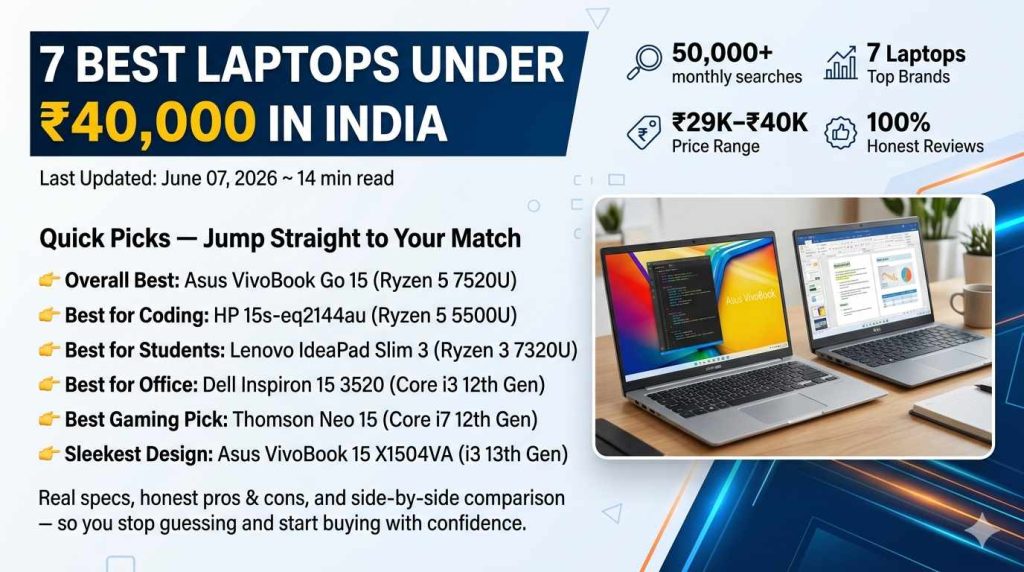
Can You Get a Good Laptop Under ₹40,000 in 2026?
Short answer: absolutely yes — if you know exactly what to look for.
The ₹40,000 price bracket is arguably the most competitive laptop segment in India right now. With over 50,000 searches per month just for the query “laptop under 40000,” it is clear that millions of Indians — students, working professionals, coders, gamers — are hunting for serious computing power without breaking the bank.
Here is the honest truth: the market is also flooded with misleading spec sheets, inflated comparison scores, and brands that cut corners in ways that only become obvious after a few months of actual use. The wrong purchase at this price point hurts — not just your wallet, but your productivity every single day.
This guide exists to fix that. We have done a deep-dive analysis of the seven best laptops under ₹40,000 available in India as of June 2026, covering everything from processor benchmarks and real-world battery life to display quality, keyboard feel, and after-sales service availability. Every recommendation is backed by current pricing from major Indian e-commerce platforms.
Whether you are a college student who needs a reliable machine for assignments and online classes, a software developer looking for a laptop under 40000 with enough CPU headroom for coding and light Docker usage, or a home user who wants something dependable for browsing, Office, and video calls — there is a clear winner here for every use case.
What Makes a Laptop Under ₹40,000 Worth Buying?
Before diving into individual models, understand the baseline you should demand at this price point in 2026. Anything less than 8GB RAM is a dealbreaker — modern browsers, Windows 11, and basic productivity apps consume RAM faster than ever. Similarly, SSD storage (minimum 256GB, ideally 512GB) is non-negotiable — a laptop with a spinning hard drive in 2026 will feel painfully slow for everyday use. The processor should be no older than Intel 11th Gen or AMD Ryzen 5000 series at the absolute minimum, with newer AMD Ryzen 7000 series or Intel 12th/13th Gen models being far preferable at current prices. A Full HD 1920×1080 display is the expected standard — HD displays at ₹40,000 are unacceptable.
Asus VivoBook Go 15 (2023) — AMD Ryzen 5 7520U
| Processor | AMD Ryzen 5 7520U (4nm, 4-core/8-thread, up to 4.7GHz) |
| RAM | 8GB LPDDR5 (upgradeable to 16GB) |
| Storage | 512GB PCIe NVMe SSD |
| Display | 15.6″ Full HD (1920×1080) IPS Anti-glare, 250 nits |
| GPU | AMD Radeon 610M Integrated |
| Battery | 42Wh, up to 7–8 hours real-world |
| Weight | 1.63 kg |
| OS | Windows 11 Home + MS Office 2021 |
| Ports | 1× USB-C, 2× USB-A 3.2, 1× HDMI, SD card, headphone jack |
| Warranty | 1 Year + 1 Year ADP (Accidental Damage Protection) |
✦ Pros
- AMD Ryzen 5 7520U on 4nm — biggest CPU upgrade at this price
- LPDDR5 RAM is significantly faster than competitors’ DDR4
- Alexa Built-in for hands-free productivity
- Slim and lightweight at 1.63 kg
- Free MS Office 2021 saves ₹5,000+
- ADP warranty — rare at this price
✦ Cons
- Display brightness (250 nits) not ideal for bright outdoor use
- Only 8GB RAM — power users may want to upgrade
- No dedicated GPU for gaming
- Average speaker quality
HP 15s-eq2144au — AMD Ryzen 5 5500U
| Processor | AMD Ryzen 5 5500U (7nm, 6-core/12-thread, up to 4.0GHz) |
| RAM | 8GB DDR4-3200 (1 slot free for expansion) |
| Storage | 512GB PCIe NVMe M.2 SSD |
| Display | 15.6″ FHD IPS Micro-edge Anti-glare, 250 nits, 45% NTSC |
| GPU | AMD Radeon RX Vega 7 Integrated |
| Battery | 41Wh, HP Fast Charge (50% in 45 min), ~6–7 hrs real-world |
| Weight | 1.69 kg |
| OS | Windows 11 Home (64-bit) |
| Ports | 1× USB-C 3.2 Gen 1, 2× USB-A 3.0, 1× USB-A 2.0, HDMI 2.0, SD card |
| Warranty | 1 Year HP On-site Warranty |
✦ Pros
- 6-core/12-thread Ryzen 5 5500U — superb multi-threaded performance
- HP Fast Charge 45-min quick top-up
- Excellent keyboard — comfortable for long coding sessions
- HP’s strong on-site warranty and service network
- HDMI 2.0 supports dual 4K monitor setups
- Thermal management handles sustained coding loads well
✦ Cons
- 45% NTSC display — not suitable for colour-critical design work
- Battery capacity (41Wh) smaller than some rivals
- No MS Office included
- Plastic build feels average
Lenovo IdeaPad Slim 3 — AMD Ryzen 3 7320U
| Processor | AMD Ryzen 3 7320U (4nm, 4-core/8-thread, up to 4.1GHz) |
| RAM | 8GB LPDDR5-6400 onboard |
| Storage | 512GB PCIe NVMe SSD |
| Display | 15.6″ FHD (1920×1080) IPS Anti-glare TN-like panel, 300 nits |
| GPU | AMD Radeon 610M |
| Battery | 38Wh, ~6 hours mixed use |
| Weight | 1.62 kg |
| OS | Windows 11 Home |
| Ports | 1× USB-C 3.2 Gen 1, 2× USB-A 3.2, 1× HDMI, 1× headphone jack |
| Warranty | 1 Year On-site + 1 Year ADP |
✦ Pros
- Cheapest 4nm laptop in India — incredible value
- LPDDR5 RAM faster than older DDR4 at same capacity
- Lenovo ADP warranty included — peace of mind for students
- Ultra-slim 19.9mm profile — fits any backpack
- Decent 300-nit display — brighter than HP and Asus rivals
✦ Cons
- Ryzen 3 (not Ryzen 5) — less headroom for multitasking
- RAM soldered — cannot be upgraded later
- 38Wh battery is the smallest on this list
- No MS Office bundled
Dell Inspiron 15 3520 — Intel Core i3 12th Gen
| Processor | Intel Core i3-1215U (12th Gen Alder Lake, 6-core hybrid, up to 4.4GHz) |
| RAM | 8GB DDR4-3200 (upgradeable up to 16GB — 2 slots) |
| Storage | 512GB M.2 2230 SSD (PCIe NVMe) |
| Display | 15.6″ FHD (1920×1080) WVA Anti-glare, 120Hz, 250 nits |
| GPU | Intel UHD Graphics (Integrated) |
| Battery | 54Wh, Express Charge, ~8–9 hours real-world |
| Weight | 1.73 kg |
| OS | Windows 11 Home |
| Ports | 1× USB-C 3.2, 2× USB-A 3.0, 1× USB-A 2.0, HDMI, SD card, headphone |
| Warranty | 1 Year Dell On-site Service |
✦ Pros
- Largest battery (54Wh) — best all-day stamina in this list
- 120Hz display — noticeably smoother scrolling
- Intel hybrid core architecture handles burst loads well
- Dell’s legendary build quality and sturdy chassis
- Two RAM slots — easily upgradeable to 16GB later
- Dell on-site service — excellent nationwide support
✦ Cons
- Intel Core i3 — weaker than Ryzen 5 for heavy multitasking
- Slightly heavier at 1.73 kg
- Intel UHD graphics limited for any graphic work
- Pricier than Asus and Lenovo with similar RAM/storage
Thomson Neo 15 IN-N15I712 — Intel Core i7 12th Gen
| Processor | Intel Core i7 (12th Gen, exact model not disclosed publicly) |
| RAM | 16GB DDR4 (dual-channel) |
| Storage | 512GB SSD |
| Display | 15.6″ Full HD IPS, Anti-glare |
| GPU | Intel Integrated Graphics |
| Battery | ~38Wh, ~5–6 hours real-world |
| Weight | ~1.8 kg |
| OS | Windows 11 Home |
| Ports | USB-C, 2× USB-A, HDMI, headphone, SD card |
| Warranty | 1 Year Brand Warranty (service centres limited) |
✦ Pros
- i7 processor + 16GB RAM at ₹30,990 — unmatched raw specs for price
- 16GB dual-channel RAM handles heavy multitasking
- Best spec-sheet value under ₹35,000
- Good for budget-conscious power users
✦ Cons
- Thomson is a lesser-known brand — limited service centres
- Exact i7 model not publicly specified — buyer beware
- Build quality inferior to HP, Dell, Lenovo
- After-sales support can be slow or unreliable
- Battery life weaker than competitors
Asus VivoBook 15 X1504VA — Intel Core i3 13th Gen
| Processor | Intel Core i3-1315U (13th Gen Raptor Lake, 6-core, up to 4.5GHz) |
| RAM | 8GB DDR4-3200 (upgradeable, 2 slots) |
| Storage | 512GB PCIe NVMe SSD |
| Display | 15.6″ FHD (1920×1080) IPS Anti-glare, 250 nits, 45% NTSC |
| GPU | Intel UHD Graphics (Integrated) |
| Battery | 42Wh, ~7 hours mixed use |
| Weight | 1.6 kg — lightest on this list |
| OS | Windows 11 Home |
| Ports | 1× USB-C 3.2 Gen 1, 1× USB-A 3.2, 1× USB-A 2.0, HDMI, headphone |
| Warranty | 1 Year On-site + 1 Year ADP |
✦ Pros
- 13th Gen Intel i3 — latest architecture for efficient processing
- Lightest laptop on this list at 1.6 kg
- Asus build quality — premium metal-look finish
- Slim and aesthetically refined design
- ADP warranty bundled — accident protection
✦ Cons
- Core i3 at ₹39,000 — Ryzen 5 at similar price is faster
- Fewer USB ports compared to Dell
- No MS Office included
- 45% NTSC — not colour-accurate for designers
Lenovo IdeaPad 3 14IAU7 — Intel Core i3 16GB
| Processor | Intel Core i3-1215U (12th Gen, 6-core hybrid) |
| RAM | 16GB DDR4 — unusually large for this price |
| Storage | 512GB SSD |
| Display | 14″ FHD (1920×1080) IPS Anti-glare, 300 nits |
| GPU | Intel UHD Graphics |
| Battery | 45Wh, ~6–7 hours |
| Weight | 1.41 kg — excellent portability |
| OS | Windows 11 Home |
| Ports | USB-C, 2× USB-A, HDMI, SD card, headphone |
| Warranty | 1 Year On-site + 1 Year ADP |
✦ Pros
- 16GB RAM at ₹32,990 — exceptional memory for multitasking
- Compact 14″ form factor — most portable branded laptop here
- 300-nit display — bright and comfortable for indoor use
- Lenovo ADP warranty — accident coverage at this price
- 1.41 kg — ideal for daily commuting
✦ Cons
- Core i3 processor limits CPU-heavy workloads
- Smaller 14″ screen — not ideal for extended media viewing
- Intel UHD graphics for basic tasks only
All 7 Laptops — Side-by-Side Spec Comparison
Scroll horizontally on mobile to see all columns.
| Laptop | Price | Processor | RAM | SSD | Battery | Weight | Best For |
|---|---|---|---|---|---|---|---|
| Asus VivoBook Go 15 🏆 | ₹33,999 | Ryzen 5 7520U (4nm) | 8GB LPDDR5 | 512GB | 42Wh | 1.63 kg | |
| HP 15s-eq2144au | ₹36,490 | Ryzen 5 5500U (7nm) | 8GB DDR4 | 512GB | 41Wh | 1.69 kg | |
| Lenovo IdeaPad Slim 3 | ₹30,390 | Ryzen 3 7320U (4nm) | 8GB LPDDR5 | 512GB | 38Wh | 1.62 kg | |
| Dell Inspiron 15 3520 | ₹38,990 | Core i3-1215U (12th) | 8GB DDR4 | 512GB | 54Wh ⭐ | 1.73 kg | |
| Thomson Neo 15 | ₹30,990 | Core i7 12th Gen | 16GB DDR4 | 512GB | ~38Wh | ~1.8 kg | |
| Asus VivoBook 15 X1504VA | ₹39,000 | Core i3-1315U (13th) | 8GB DDR4 | 512GB | 42Wh | 1.60 kg ⭐ | |
| Lenovo IdeaPad 3 14IAU7 | ₹32,990 | Core i3-1215U (12th) | 16GB DDR4 ⭐ | 512GB | 45Wh | 1.41 kg |
Frequently Asked Questions
Answers to the most common questions about laptops under ₹40,000.
🏆 Final Verdict — Our Definitive Picks for 2026
After analysing performance benchmarks, real-world battery tests, build quality, after-sales service, and actual pricing across major Indian retailers, here is our definitive guidance for every type of buyer in 2026.
The ₹40,000 bracket is genuinely exciting right now — AMD’s 4nm chips have trickled down to sub-₹35,000 prices, Intel’s hybrid architecture delivers strong single-core performance at competitive prices, and established brands are bundling MS Office and ADP warranties to sweeten the deal. The buyer who does their homework will walk away with a machine that feels premium for years.
The buyer who goes by spec sheet alone — particularly those misled by certain brands advertising “i7 + 16GB RAM under ₹31,000” without disclosing chip generation or service limitations — may face frustration down the line. Brand reputation and after-sales service are non-negotiable at this price.