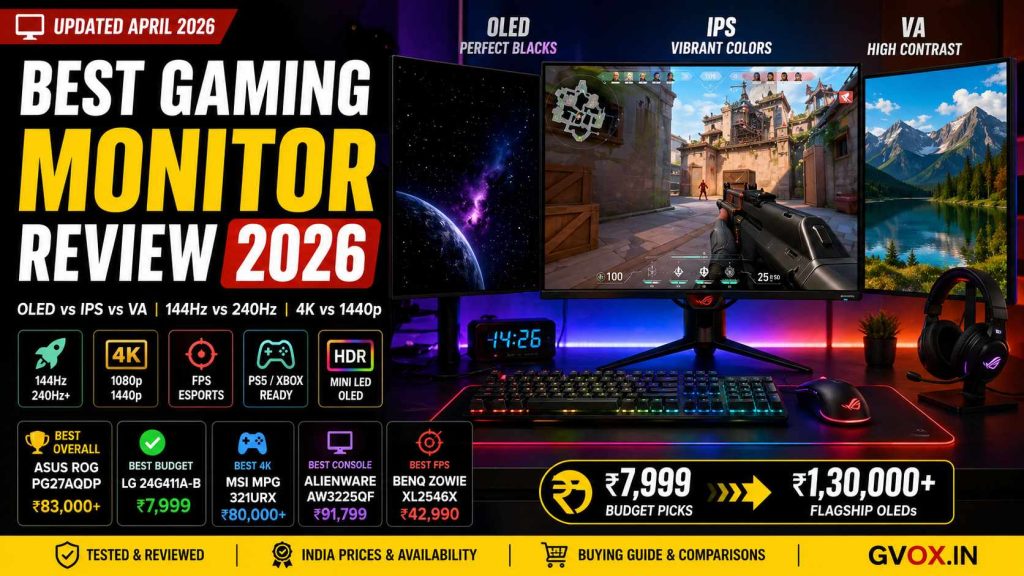
Best Gaming Monitor Review 2026: Top Picks, Buying Guide & Full Comparisons India
OLED vs IPS vs VA, 144Hz vs 240Hz, 4K vs 1440p — every question answered. Top monitors tested from ₹7,999 budget picks to ₹1,30,000 flagship OLEDs. India-specific prices, availability, and buying advice.
🏆 Quick Summary — Best Gaming Monitor 2026 (India)
In 2026, the gaming monitor market has split into two clear tracks: high-refresh OLED panels that deliver perfect visuals with near-instant response, and affordable IPS/Mini LED monitors that give you great speed and color without the premium price. This guide covers every type of gamer and every budget available in India — from ₹7,999 entry-level 144Hz IPS monitors to ₹1,30,000+ flagship 4K OLEDs.
📑 Table of Contents
01. Best Overall Gaming Monitors 2026
🥇 Asus ROG Swift OLED PG27AQDP — Best Overall
The definitive all-rounder for competitive gamers in 2026. This 27-inch 1440p WOLED hits a 480Hz refresh rate with a near-instant 0.03ms response time — the fastest combination available in any monitor today. Whether you play Valorant, CS2, or Cyberpunk, this monitor handles everything at the highest level.
🥈 MSI MPG 321URX QD-OLED — Best 4K Value
A 32-inch 4K QD-OLED that is the top-rated choice for resolution-first gamers. At 240Hz with perfect blacks and a 0.03ms response, it competes directly with monitors that cost ₹20,000–₹30,000 more. Overwhelmingly positive user reviews praise its visual performance for cinematic and competitive gaming alike.
📊 Summary — Top Overall Gaming Monitor Picks 2026
02. Gaming Monitor Buying Guide
1. Resolution — How Sharp is the Image?
1080p (FHD): Best for budget builds or competitive players who want the highest possible frame rates. Easy on your GPU. Ideal for 24-inch screens — avoid going larger as pixels become visible.
1440p (QHD): The sweet spot for most gamers. Sharp image at 27 inches without requiring a ₹50,000+ GPU. The best all-around choice for Indian gamers at mid-range budgets.
4K (UHD): Stunning for RPGs and cinematic games. Requires a high-end GPU (RTX 4080/4090 level) to run at high settings. Not suitable for competitive FPS at max quality settings.
2. Refresh Rate — How Smooth is the Motion?
Refresh rate is how many times per second the screen updates. Higher means smoother movement and faster reaction windows for competitive gaming.
3. Panel Type — Color vs. Speed vs. Contrast
IPS: Best all-rounder. Great colors, wide viewing angles, fast enough for most gaming. The default recommendation for 90% of gamers.
OLED: Gold standard. Perfect blacks, infinite contrast, instant 0.03ms response. Expensive but unbeatable for visual quality. Minor burn-in risk with static elements over thousands of hours.
VA: Strong contrast and affordable. Best for dark room gaming. Avoid for competitive play — “black smearing” causes trailing blur on fast-moving objects.
Mini-LED: LCD upgrade. Gets much brighter than OLED and offers great HDR. Best value for HDR performance at mid-range prices.
4. Response Time
Always look for 1ms GtG or lower. Response time determines how quickly a pixel changes color — high response times cause motion blur that makes tracking targets in fast games significantly harder. OLED achieves 0.03ms. IPS panels typically offer 0.5ms–1ms. VA panels often lag at 4ms–5ms on budget models.
5. Variable Refresh Rate — G-Sync & FreeSync
These technologies sync your monitor to your GPU to eliminate screen tearing (where the image appears “split” horizontally). G-Sync works with NVIDIA cards. FreeSync works with AMD cards and often with NVIDIA too. Always choose a monitor with one of these — the experience without VRR in demanding games is noticeably inferior.
03. 144Hz vs 240Hz — Refresh Rate Explained
Think of refresh rate as the “frame limit” of your monitor. Your PC might output 300 FPS in Valorant, but a 144Hz monitor only shows 144 of those frames per second. The gap between what your GPU sends and what your monitor shows is wasted performance — and higher refresh rate closes that gap.
| Refresh Rate | Best For | GPU Requirement | Worth It? |
|---|---|---|---|
| 60Hz | Office work, slow-paced games | Any GPU | Not for gaming in 2026 |
| 144Hz – 180Hz | All game types — sweet spot | Mid-range (RTX 4060) | Yes — for most gamers |
| 240Hz | Competitive FPS (Valorant, CS2) | High-end (RTX 4070+) | Yes — if you play FPS seriously |
| 360Hz – 540Hz | Professional esports | Top-tier GPU | Only for pro-level players |
The visual difference from 60Hz to 144Hz is enormous — everyone notices it immediately. The difference from 144Hz to 240Hz is real but smaller, and only matters significantly in fast-paced FPS games. The jump from 240Hz to 360Hz+ is marginal for most players.
04. IPS vs VA vs OLED — Panel Type Guide
Panel type is the single most impactful spec for image quality. Two monitors with identical refresh rates and resolutions can look completely different based on panel technology. Here is exactly what each type gives you and takes away.
| Feature | IPS Panel | VA Panel | OLED Panel | Mini-LED (IPS) |
|---|---|---|---|---|
| Color Accuracy | Excellent | Good | Excellent | Excellent |
| Black Levels | Mediocre (IPS glow) | Superior | Perfect (infinite contrast) | Very good |
| Response Time | Fast (0.5–1ms) | Slow at dark tones (4ms+) | Instant (0.03ms) | Fast |
| Viewing Angles | Wide | Narrow | Wide | Wide |
| Brightness | 300–500 nits | 250–400 nits | 600–1,000 nits peak | 1,000–2,000 nits |
| Burn-In Risk | None | None | Minor risk (static elements) | None |
| Price | Standard | Cheaper | Very expensive | Mid-premium |
| Best For | Competitive gaming, productivity | Dark room, RPGs, movies | All-rounder premium | HDR, bright rooms |
05. Best Budget Gaming Monitors India 2026
🥇 LG UltraGear 24G411A-B — Best Under ₹8,000
The top budget recommendation for reliability and brand support. A 24-inch FHD IPS monitor with 144Hz, 1ms motion blur reduction, and NVIDIA G-Sync compatibility. LG’s IPS panels consistently outperform cheaper competitors for color consistency, and the brand’s local warranty support in India is among the better options at this price tier.
🥈 Acer Nitro VG240Y — Best 200Hz Under ₹9,500
The fastest panel in this price bracket. A 200Hz IPS monitor at ₹8,999–₹9,499 with AMD FreeSync Premium and HDR10. If you want the highest refresh rate on the tightest budget, this is the pick. The 0.5ms response time is genuinely competitive for FPS gaming at this price.
🥉 MSI G255F — Best for Competitive Play Under ₹10,000
Designed specifically for competitive gaming with a Rapid IPS panel. 24.5-inch, 180Hz, 1ms GtG. The slightly larger screen size versus the LG gives a bit more field of view, and the Rapid IPS panel has faster pixel transitions than standard IPS at dark tones.
| Model | Resolution | Refresh Rate | Best For | Price (India) |
|---|---|---|---|---|
| LG 24G411A-B | 1080p | 144Hz | Brand reliability, daily driver | ₹7,999 |
| Acer Nitro VG240Y | 1080p | 200Hz | Fastest budget panel | ₹8,999 |
| MSI G255F | 1080p | 180Hz | Competitive FPS | ₹9,250 |
| Samsung Odyssey G3 | 1080p | 180Hz VA | Dark room gaming | ₹10,499 |
| AOC Q27G3XMN | 1440p | 180Hz Mini-LED | Best 1440p HDR value | ~₹25,000 |
06. Best 4K Gaming Monitors 2026
4K gaming in 2026 is finally accessible without compromise — OLED and QD-OLED panels now offer 4K at 240Hz with the best image quality available. However, to actually run games at 4K with high settings and high frame rates, you realistically need an RTX 4080/4090 or RTX 50-series equivalent GPU. Without that, 4K at 60Hz–120Hz is achievable on mid-range hardware.
07. Best Gaming Monitors for FPS Games
For competitive FPS, the priority order is: response time first, refresh rate second, resolution third. A 1080p 240Hz monitor with 0.5ms response time will outperform a 4K 144Hz monitor in competitive play every time — you trade visual clarity for the speed advantage that wins gunfights.
| Model | Refresh Rate | Panel | Key FPS Feature | Price (India) |
|---|---|---|---|---|
| Asus ROG PG27AQDP | 480Hz | OLED | 0.03ms — Best speed + quality | ₹83,000+ |
| BenQ Zowie XL2546X | 240Hz | Fast TN | DyAc 2 — Clearest motion strobing | ₹42,990 |
| Alienware AW2524HF | 500Hz | IPS | Extreme input latency reduction | ~₹50,000 |
| MSI MPG 271QRX | 360Hz | QD-OLED | Speed + color — best balance | ~₹75,000 |
| ViewSonic XG2431 | 240Hz | IPS | Blur Busters 2.0 — best budget FPS | ₹21,799 |
08. Best Gaming Monitors for PS5 & Xbox Series X
For PS5 and Xbox Series X, the key spec is HDMI 2.1 — without it, you cannot get 4K at 120Hz from the console. Standard HDMI 2.0 limits you to 4K at 60Hz or lower resolutions at 120Hz. VRR (Variable Refresh Rate) support is also important to prevent screen tearing at variable frame rates in console games.
| Feature | Why It Matters for PS5 / Xbox |
|---|---|
| HDMI 2.1 | Necessary for 4K resolution at 120Hz — the key feature of next-gen consoles |
| VRR Support | Eliminates screen tearing during frame rate drops in demanding console games |
| 4K Resolution | Maximises visual quality of next-gen titles that render natively at 4K |
| HDR (600 nits+) | Enhances contrast and color depth — look for DisplayHDR 600 or higher for impact |
| Dolby Vision | Xbox-specific HDR format — produces better HDR than standard HDR10 on supported titles |
09. Curved Gaming Monitors — Are They Worth It?
Curved monitors wrap the screen into your peripheral vision, maintaining a more uniform distance from your eyes to every point on the screen. For large-screen or ultrawide gaming, this significantly reduces the feeling that you’re looking at a flat panel. However, curved screens are not ideal for multi-monitor setups or for productivity work involving straight lines and precision design.
✅ Curved — Pros
Increased immersion — wraps the image into peripheral vision, especially impactful at 27″+ and ultrawide sizes.
Reduced eye strain — uniform focal distance means your eyes travel less during long gaming sessions.
Less edge distortion on large panels — corrects off-axis viewing issues common on large flat displays.
❌ Curved — Cons
Geometric distortion for professional work — straight lines appear slightly bent, not ideal for design or spreadsheets.
Glare reflection is wider — curved surfaces can stretch reflections across more of the panel.
Not ideal for multi-monitor setups — inner edges of curved panels do not align cleanly with adjacent flat monitors.
10. Gaming Monitor Pros & Cons
✅ Gaming Monitor — Pros
Motion Clarity: 144Hz+ and 1ms response make movement smooth and sharp — critical for tracking fast targets in shooters.
Lower Input Lag: Gaming monitors are engineered for fast signal processing — your mouse clicks register faster on screen.
VRR Technology: G-Sync and FreeSync eliminate screen tearing without the input lag penalty of traditional V-Sync.
Gaming Features: Black Stabilizer (see enemies in dark corners), crosshair overlays, FPS counters, and low-latency modes built directly into monitor hardware.
❌ Gaming Monitor — Cons
The “Gamer Tax”: You pay a premium for high refresh rates — a 4K 144Hz gaming monitor costs significantly more than a 4K 60Hz office display with identical color quality.
IPS Glow / VA Smearing: IPS panels have corner glow in dark scenes. Budget VA panels create muddy dark trails on fast objects.
OLED Burn-In: The gold standard for gaming performance, but long-term static elements (taskbar, game HUD) carry a minor risk of permanent image retention.
Text Clarity on Some OLEDs: Certain OLED pixel layouts can create slight color fringing on text — less ideal for heavy productivity work.
11. Which Gaming Monitor Should You Buy?
The “best” gaming monitor entirely depends on your GPU, the games you play, and your budget. Here is the clearest recommendation guide based on those three variables.
🔄 At a Glance — Best Gaming Monitor by Category (India 2026)
🏁 Final Verdict — Gaming Monitor Buying Guide 2026
In 2026, there has never been a better time to buy a gaming monitor at any budget. At the entry level, ₹7,999–₹10,000 gets you a genuine 144Hz–180Hz IPS panel that transforms the gaming experience versus a 60Hz screen. In the mid-range, Mini LED technology has made its way into sub-₹25,000 monitors, giving 1440p with competitive HDR performance. And at the premium tier, QD-OLED panels offer a combination of speed, color, and contrast that was unimaginable at any price five years ago.
For most Indian gamers, the sweet spot remains the ₹8,000–₹25,000 range. The LG 24G411A-B at ₹7,999 is the safest budget pick — dependable, fast, and well-supported. The AOC Q27G3XMN at ~₹25,000 is the most impressive value upgrade if you can stretch your budget. Both will be an enormous improvement over any 60Hz monitor you might be upgrading from.
If gaming is your primary activity and you have the GPU to support it — invest in at least a 144Hz IPS panel. The difference from 60Hz to 144Hz is one of the most immediately impactful upgrades you can make to your gaming setup, at any budget.
🔗 Related Articles on Gvox.in
Frequently Asked Questions
- SOURCE LINK= https://www.rtings.com/monitor/reviews/best/by-usage/gaming
- https://tftcentral.co.uk/recommendations/the-best-recommended-gaming-monitors-2026
- https://www.asus.com/in/content/best-gaming-monitor/
- https://www.youtube.com/watch?v=U70Mf0URWMw
- https://www.reddit.com/r/buildapcmonitors/comments/1k4w6kp/best_monitors_for_gaming/
- https://www.nvidia.com/en-us/geforce/products/g-sync-monitors/
- https://www.lenovo.com/in/en/knowledgebase/how-to-choose-the-best-gaming-monitor-for-your-setup/?srsltid=AfmBOoowOFim428wj1NiMc95jb9SdsUoSIpnljVNKkmX9w5jG95FGedR
- https://mdcomputers.in/catalog/monitor/gaming-monitor?srsltid=AfmBOoruAuXYrrT1Ya9KHnH5TXQFJbu_54xcOemVpg5KrO6dyxWlpRuu