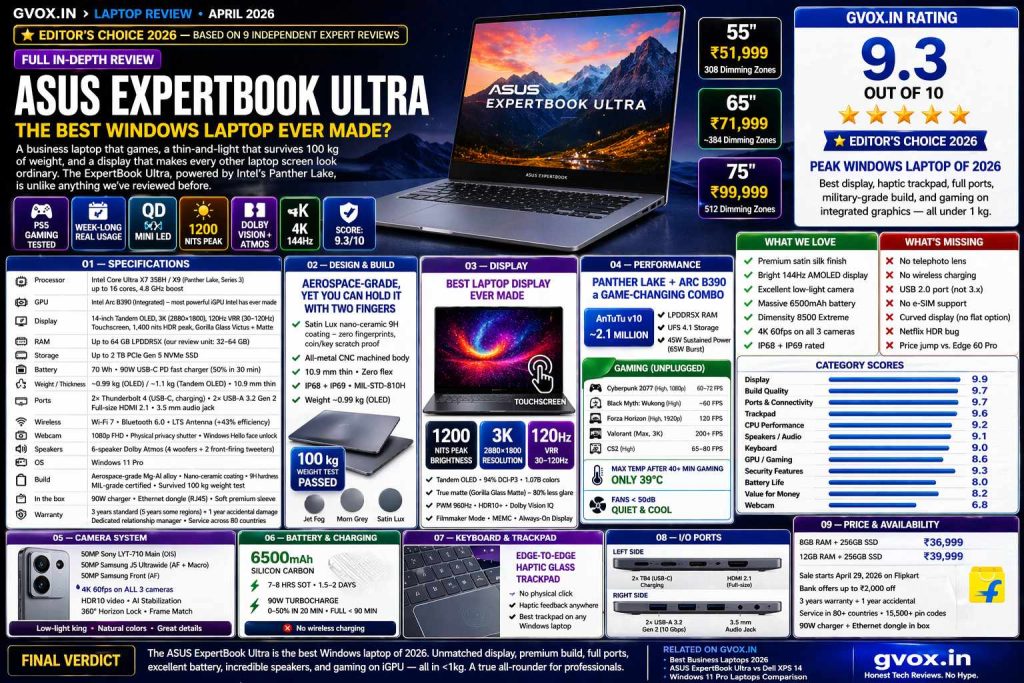
ASUS ExpertBook Ultra
Full Specifications at a Glance
| Processor | Intel Core Ultra X7 358H / X9 (Panther Lake, Series 3) — up to 16 cores, 4.8 GHz boost |
| GPU | Intel Arc B390 (Integrated) — most powerful iGPU Intel has ever made |
| Display | 14-inch Tandem OLED, 3K (2880×1800), 120Hz VRR (30–120Hz), Touchscreen, 1,400 nits HDR peak, Gorilla Glass Victus + Gorilla Glass Matte |
| RAM | Up to 64 GB LPDDR5X (our review unit: 32–64 GB) |
| Storage | Up to 2 TB PCIe Gen 5 NVMe SSD |
| Battery | 70 Wh · 90W USB-C PD fast charger (50% in 30 min) |
| Weight | ~0.99 kg (OLED variant) / ~1.1 kg (Tandem OLED) |
| Thickness | 10.9 mm — Zero flex, Zero wobble |
| Build | Aerospace-grade Magnesium-Aluminium Alloy · CNC machined · Nano-ceramic coating · 9H hardness |
| Ports | 2× Thunderbolt 4 (USB-C, charging) · 2× USB-A 3.2 Gen 2 (10 Gbps) · Full-size HDMI 2.1 · 3.5 mm audio jack |
| Wireless | Wi-Fi 7 · Bluetooth 6.0 · LTS Antenna tech (+43% efficiency) |
| Webcam | 1080p FHD · Physical privacy shutter · Windows Hello face unlock |
| Speakers | 6-speaker Dolby Atmos (4 woofers + 2 front-firing tweeters) |
| Keyboard | Chiclet · 1.5 mm key travel · Spill-resistant · Adaptive backlight |
| Trackpad | Edge-to-edge haptic glass trackpad — No physical click |
| Security | Fingerprint (power btn) · IR face unlock · TPM 2.0 · Dual BIOS chips · Microsoft Secured-Core PC · NIST firmware standard · ASUS Expert Guardian |
| AI | 50 TOPS NPU (dedicated) · 180 TOPS total platform · On-device AI |
| Cooling | Expert Cool Pro · Vapour chamber · Dual fans · Triple rear outlets · Cools CPU + SSD + RAM |
| OS | Windows 11 Pro |
| Colours | Jet Fog · Morn Grey |
| In the box | 90W charger · Ethernet dongle (RJ45) · Soft premium sleeve |
| Warranty | 3 years standard (5 years some regions) + 1 year accidental damage · Dedicated relationship manager |
| Durability | MIL-grade certified · Survived 100 kg weight test · Coin/key scratch resistant · Coin scratch tested — zero damage |
| Certifications | US NIST firmware standard · Microsoft Secured-Core · Service across 80 countries · 15,500+ pin codes (India) |
Aerospace-Grade, Yet You Can Hold It With Two Fingers
Pick up the ExpertBook Ultra and the first thing you say is what every single reviewer said: “Oh my God, it’s so light.” At just under 1 kg — the OLED variant weighing in at 0.99 kg and the Tandem OLED at ~1.14 kg — this is one of the lightest full-featured laptops ever made. You can hold it with two fingers. Carry it all day in a backpack and you won’t even notice it’s there.
But lightweight doesn’t mean fragile. ASUS uses the same aerospace-grade magnesium-aluminium alloy that Formula 1 teams use in their cars. The entire chassis is CNC-machined from a single piece of metal, and at just 10.9 mm thin, there is zero flex and zero wobble — something rare on laptops this slim.
What makes the surface truly special is the nano-ceramic coating covering the entire chassis — lid, palm rest, even the key caps. ASUS calls it “Super Nano-Ceramic” and it carries a 9H hardness rating. To demonstrate, multiple reviewers aggressively scratched the surface with coins, keys, and chains — then wiped it clean to reveal zero scratches. The coating also makes it completely fingerprint-proof, unlike most metal laptops.
Available in two subdued, professional colours — Jet Fog and Morn Grey — neither looks like the boring black-slab business laptop of the last decade. It’s minimal, elegant, and the kind of laptop you’ll actually be proud to open in a coffee shop or a boardroom. There’s even an Expert Luma lighting strip along the front edge that animates on boot, login, and shutdown — a small touch that’s “completely addictive,” as one reviewer put it.
The Best Laptop Display Ever Made — Multiple Reviewers Agree
Every single reviewer who covered the ExpertBook Ultra described its display in superlatives. One called it “the best display I’ve ever seen on any laptop.” Another said “even if I compare it to Mac, this display is the best.” These are not marketing claims — these are independent reviewers coming to the same conclusion independently.
The key is Tandem OLED technology. Unlike regular OLED which uses a single panel layer, Tandem OLED stacks two OLED layers on top of each other — similar to what Apple uses in the iPad Pro Ultra Retina XDR display. The result is remarkable:
But the most remarkable feature is the Gorilla Glass Matte anti-reflective coating. Unlike cheaper matte coatings that are just films stuck on top (which blur colors), this is bonded directly to the screen glass. Reviewers held studio lights and flashlights directly at the screen — and the reflections were near-invisible. One reviewer removed the light from right in front of the panel and said: “That’s it? That’s the reflection? Are you kidding me?”
Intel Panther Lake: Fed Its Full Power Budget
The Intel Core Ultra Series 3 (Panther Lake) is the most important Intel laptop chip in years. The ExpertBook Ultra is available with the X7 (16 cores, up to 4.8GHz) or the X9 variant. What sets this laptop apart from competing Panther Lake machines is critical: ASUS feeds this chip its full 45W sustained power (65W burst), whereas Dell’s XPS 14 with the same X7 chip caps it at just 25W sustained.
In benchmarks, this difference is dramatic — particularly in Cinebench (a maximum-load CPU test), where the ExpertBook Ultra significantly outperforms the XPS 14 despite having identical silicon. This is a configuration advantage, not a chip advantage.
The Intel Arc B390 integrated GPU is the biggest surprise in the ExpertBook Ultra. In GPU benchmarks, it scores approximately twice the performance of last generation’s Arc 140V — and in some real-world tests, reviewers found it 35% faster than an Nvidia RTX 4050 running in a similarly-sized laptop. An integrated GPU beating a dedicated GPU is something no reviewer expected to write about in 2026 — but here we are.
In daily productivity use — 100+ browser tabs, Slack, Notion, Zoom calls, running local LLM models (20-billion parameter models via LM Studio or Ollama at 25–30 tokens/second), video editing (4K single-stream, Full HD multi-stream) — the laptop handles everything without lag, without stutter, without the fans suddenly screaming.
AAA Gaming on a Business Laptop — Tested Unplugged
All gaming tests below were conducted without the charger plugged in. This is remarkable because most gaming laptops need to be plugged in for any serious gaming. The ExpertBook Ultra with its Arc B390 GPU and Panther Lake chip changes the expectation entirely.
One reviewer started gaming at 66% battery, played all four test games for approximately 1.5 hours (including Cyberpunk at native 3K resolution), and ended at 23% battery. That’s solid gaming endurance for an ultra-thin business laptop with no discrete GPU.
The Trackpad That Beats MacBook — And Keyboard That Rivals ThinkPad
The keyboard has 1.5 mm key travel — deep for a 10.9mm thin laptop. The feel is tactile and clicky without being loud. Keys are smooth to the touch (same nano-ceramic material as the chassis) and the backlighting is adaptive: it turns on automatically in dark rooms and switches off in bright environments so you can actually read the key labels. The full keyboard is spill-resistant — a coffee accident won’t end your relationship with this laptop.
The edge-to-edge haptic glass trackpad is where this laptop truly surprises. There is no physical click mechanism. The entire surface is clickable, with haptic motors underneath delivering feedback. Reviewers who had used MacBook Pros and Surface Books with haptic trackpads said the ExpertBook Ultra’s trackpad felt even better — more crisp, more accurate, more satisfying. When you swipe to adjust volume or brightness, you feel a haptic pulse with each step — an experience one reviewer described as “exactly like scrolling on a Pixel phone” and “completely addictive.”
The trackpad extends to the very edge of the laptop, creating a natural one-finger lift spot to open the lid. Palm rejection is excellent despite the large size. Multiple gestures work flawlessly.
All-Day Battery — With One Important Caveat
ASUS claims 24–26 hours of battery life. Real-world testing shows more nuanced numbers. The 70 Wh battery combined with the Tandem OLED’s 40% lower power consumption and Panther Lake’s efficiency produces genuinely excellent battery life — but not necessarily the class-leading numbers the marketing suggests.
The 90W USB-C PD charger delivers 50% charge in just 30 minutes, and a full charge from 0–100% takes under 90 minutes. You can also charge from any USB-C source — phone chargers, power banks, airplane seats, car chargers. One reviewer noted the idle overnight drain was only 5%, similar to ARM MacBooks.
Speaker System That Challenges MacBook Pro — Webcam That Doesn’t
The 6-speaker Dolby Atmos system (4 woofers at the bottom, 2 front-firing tweeters) is the best speaker setup reviewers have heard on any Windows laptop. One reviewer said it “beats most Windows laptops at 50–60% volume while maintaining detail and depth.” Another said it was “loud enough to potentially replace a small TV” — no crackling even at maximum volume. The Logic-7 amp implementation and spatial audio processing create a surround effect from a thin machine.
Two AI-powered noise-cancellation microphones ensure the person on the other end of your video call always hears you clearly — even in loud open offices or cafes. This alone is worth noting for any professional who takes calls on the go.
Enterprise-Grade Security in a Consumer Laptop
The ExpertBook Ultra’s security stack is extraordinary for what is marketed partly as a consumer device. It includes:
| BIOS Protection | Dual physical BIOS chips — if one is compromised/corrupted in an attack, the second kicks in and self-heals automatically. Most laptops have only one BIOS chip. |
| Firmware Standard | US NIST guidelines for resilient system firmware — rare outside commercial/government laptops |
| Secured-Core PC | Microsoft Secured-Core PC certification — hardware-level protection against firmware attacks |
| Security Processor | ASUS Expert Guardian — dedicated security processing unit with BIOS-level protection |
| Storage | Self-encrypting SSD support |
| Authentication | Fingerprint sensor (power button) + IR face recognition (Windows Hello) |
| Privacy | Physical webcam shutter with clear indicator LED · Volume + mic keys with LED status |
| Data Safety | TPM 2.0 chip · Local AI processing (no cloud uploads needed) |
For anyone handling sensitive business data — client files, financial documents, proprietary designs — this security setup provides genuine peace of mind that most consumer laptops simply don’t offer.
How It Stacks Up Against Key Rivals
Category-by-Category Scores
Pros & Cons
India Pricing & Variants
Available on Flipkart with ASUS service packs. Global price approximately $2,000 USD. Includes 3-year warranty, 1-year accidental damage protection, dedicated personal relationship manager, and service across 80+ countries and 15,500+ pin codes in India.
- Sourcelink: https://www.asus.com/laptops/for-work/expertbook/asus-expertbook-ultra
- https://fossbytes.com/asus-expertbook-ultra-launch/
- https://zeenews.india.com/technology/asus-expertbook-ultra-launched-in-india-price-features-ai-capabilities-and-more-3040316.html
- https://www.fonearena.com/blog/480908/asus-expertbook-ultra-expertbook-p3-p5-series-price-india-features.html
- https://timesofindia.indiatimes.com/technology/laptops-pc/asus-expertbook-ultra-and-expertbook-p-series-launched-in-india-price-features-and-availability/articleshow/130456131.cms
- https://www.asus.com/laptops/for-work/all-series/filter?SubSeries=ExpertBook-Ultra
- https://www.hindustantimes.com/technology/asus-expertbook-ultra-laptop-launched-in-india-with-built-in-ai-processing-capabilities-101776863340641.html