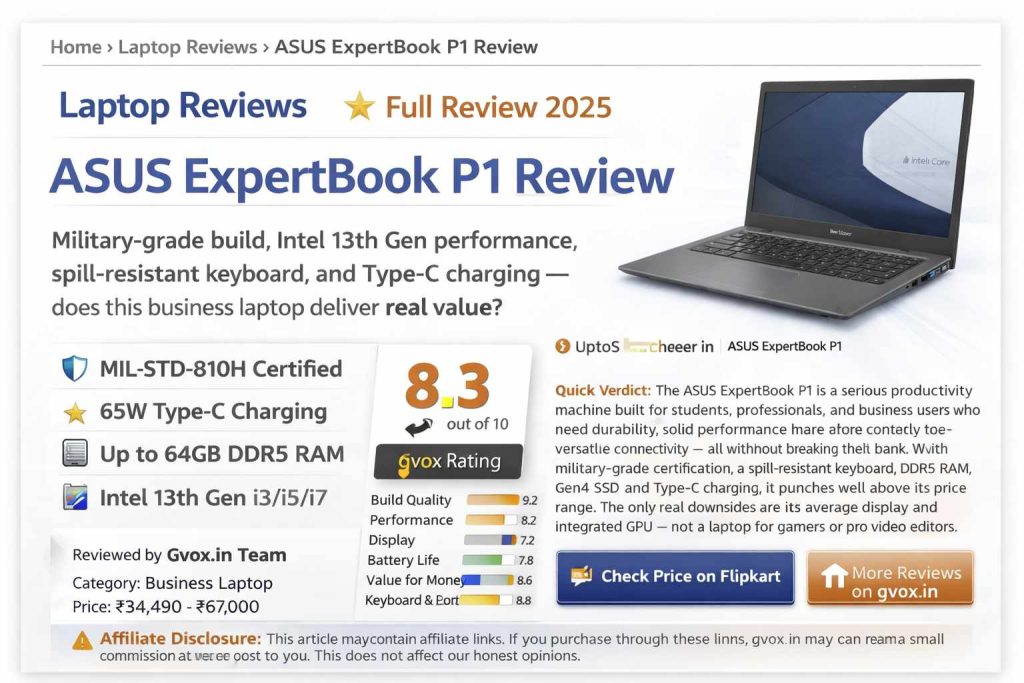
ASUS ExpertBook P1 Review
Military-grade build, Intel 13th Gen performance, spill-resistant keyboard, and Type-C charging — does this business laptop deliver real value?
📋 Table of Contents
Design & Build Quality
The ASUS ExpertBook P1 arrives in a clean Misty Grey color with subtle, classy ExpertBook branding on the lid. It’s made of polycarbonate (ABS) plastic — not metal — but don’t let that fool you. The build feels premium, solid, and professional with precise edge finishing and tight tolerances.
At just 1.41–1.63 kg (14-inch), it is genuinely lightweight for an all-day carry. The lid opens smoothly with one hand, the hinge goes all the way to 180° flat, and there’s very minimal screen wobble thanks to well-tuned damping.
We also found real-world independent testers confirming that the P1 survived being stood on (60–70 kg person), multiple drops from table height, coffee spills on the keyboard, and even a 15kg weight hung from the LAN port — all with no structural damage. That’s extraordinary for a laptop in this price range.
The air exhaust is positioned so hot air exits away from the display and trackpad — a thoughtful thermal design detail that keeps the working surface comfortable even under load.
Display & Audio
The ExpertBook P1 comes in 14-inch and 15.6-inch variants, both with a Full HD (1920×1080) IPS panel. The matte anti-glare finish eliminates reflections, making it usable outdoors or near windows.
| Panel Type | IPS (Wide View Angle) |
| Resolution | 1920 × 1080 Full HD |
| Refresh Rate | 60Hz |
| Brightness | 300 nits peak |
| Color Gamut | 45% NTSC |
| Screen-to-Body Ratio | 87% |
| Surface | Matte Anti-Glare |
| Hinge | 180° flat lay |
Color accuracy at 45% NTSC is adequate for Office work, video calls, OTT streaming, and general productivity — but not suitable for professional photo/video editing requiring color accuracy. Viewing angles are genuinely wide with no negative image issues from the side.
Audio: Two 2-watt bottom-firing speakers powered by Dirac Audio technology deliver clear, surprisingly loud sound for a business laptop. Four sound modes — Music, Gaming, Movie, and Voice — are available through the MyASUS app. Bass is modest, but clarity and volume for calls and media consumption are more than adequate.
Webcam: A 720p webcam with dual-array AI noise-cancelling microphone. Privacy shutter is included. Quality is acceptable for video calls though 1080p would have been better in 2025. The ASUS AI Sense software adds background blur, auto-framing (motion tracking), gaze correction, and lighting optimization.
Keyboard & Trackpad
The ExpertBook P1 keyboard is one of its best features. The spill-resistant backlit keyboard (3-level brightness) has a 1.3–1.35mm key travel with satisfying tactile feedback. Flex is minimal even under hard typing pressure.
- Spill-resistant design handles accidental liquid spills without damaging internals
- Dedicated blue-highlighted shortcut keys for Mute, Volume Up/Down, and Mic — perfect for meetings
- Dedicated Copilot AI key for one-press Microsoft AI access
- Three-level backlight brightness adjustable via F7
- 14-inch has tenkeyless layout; 15.6-inch has full-size keyboard with numpad
The trackpad is glass-finished, supports all Windows 11 gestures, and has an integrated fingerprint sensor in the top-right corner. Response is fast and accurate. The fingerprint sensor unlocks the device almost instantly.
Ports & Connectivity
For a thin business laptop, the ExpertBook P1 has an impressive and complete port selection:
| Left Side | 2× USB 3.2 Gen 2 Type-C (10Gbps, charging, display out) + 1× HDMI 1.4 (4K@30Hz) + 1× USB 3.2 Gen 1 Type-A (5Gbps) + 3.5mm audio jack |
| Right Side | 1× Kensington Lock slot + 1× RJ45 Ethernet + 1× USB 3.2 Gen 1 Type-A (5Gbps) |
| Charging | 65W USB-C (PD + PPS) — also supports power banks and phone chargers |
| Wi-Fi | Wi-Fi 6 (802.11ax) |
| Bluetooth | 5.4 |
| Ethernet | RJ45 Gigabit LAN (rare for thin laptops) |
Performance & Benchmarks
The ExpertBook P1 is available in three processor options — all Intel 13th Gen:
| i3 Variant | Intel Core i3-1315U (6C/8T, 4.5GHz boost, 15W TDP) |
| i5 Variant | Intel Core i5-13420H (8C/12T, 4.6GHz boost, 15–45W TDP) |
| i7 Variant | Intel Core i7-13620H (10C/16T, 4.9GHz boost, 45W TDP) |
| RAM | 16GB or 32GB DDR5 5200MT/s (up to 64GB expandable) |
| Storage | 512GB PCIe Gen4 NVMe SSD (Zeen4) — 2 M.2 slots |
| GPU | Intel UHD / Iris Xe Integrated Graphics |
i7 Variant Benchmark Scores (CineBench R23):
Real-World Performance:
- i7 variant: Smooth 4K video editing in AdobePremiere Pro; camera footage import with no lag; Android Studio with Pixel 4 emulator ran butter-smooth without power adapter
- i5 variant: 1080p video editing in Filmora and Premiere; 57-second render for 2-minute FHD project; Photoshop with multiple layers runs smoothly
- i3 variant: Best for Office, browsing (30–40 tabs), basic coding, FHD YouTube-level video editing
- Gaming (i7): GTA V at 1080p normal settings — 60–70 FPS; Valorant at 1080p high — 120–150+ FPS; CS2 — 30 FPS (requires lower settings)
- Thermals: Max CPU temp ~75–76°C during gaming; Prime95 stress test: avg 80°C, max 92°C — acceptable for an H-class processor in a thin body
AI Features (ASUS ExpertPanel)
The ExpertBook P1 includes ASUS’s dedicated ExpertPanel — a business-focused AI feature suite that goes beyond the typical Copilot button:
- Webcam Watermark: Display a QR code / business card in the webcam feed so meeting participants can scan your contact details in real time
- Screen Watermark: Protect your presentation content — add your name as a watermark to prevent screenshotting during meetings
- AI Meeting Minutes: Automatically transcribes the full meeting audio, identifies each speaker separately, and provides a post-meeting summary with the full transcript
- AI Translated Subtitles: Real-time translation and subtitles during cross-language meetings
- AI Noise Cancellation: Dual-sided noise reduction — cancels background noise from your side AND the caller’s side
- ASUS AI Sense (Webcam): Background blur, auto-framing, gaze correction, motion tracking, appearance filter, lighting optimization
- Dedicated Copilot Key: One-press access to Microsoft Copilot AI
Battery Life
| Battery Capacity | 50Whr 3-cell |
| Charger | 65W USB-C (PD + PPS) |
| Charge to 60% | ~49 minutes |
| i7 Real-world (mixed use) | 5–7 hours |
| i5 S-class (basic tasks) | 3–4 hours under heavy load; 5–6 hours light use |
| i7 — Video playback (80% brightness) | ~5 hours |
| i7 — GTA V on battery | ~2 hours at 40–45 FPS |
Battery life is solid for the i7 H-class variant — 5–7 hours of real mixed-use work is genuinely good for a 45W processor. The MyASUS app includes a Battery Care Mode that charges only to 80% to extend long-term battery health.
P1 vs P3 vs P5 — Comparison
| Feature | ExpertBook P1 | ExpertBook P3 | ExpertBook P5 |
|---|---|---|---|
| Build Material | Polycarbonate (Plastic) | Aluminum | Aluminum |
| Processor | Intel i3/i5/i7 13th Gen H | Intel i7 13th Gen | Intel Core Ultra 7/9 |
| Display | FHD 60Hz, 300 nits, 45% NTSC | 14″ 16:10, 63% sRGB | 2.5K 144Hz, 100% sRGB, 400 nits |
| GPU | Intel UHD / Iris Xe | Intel Iris Xe | Intel Arc 140 (2× iGPU) |
| RAM | Up to 32GB DDR5 | 16GB DDR5 | Up to 32GB DDR5 |
| Battery | 50Whr | 50Whr | 63Whr (~28 hrs rated) |
| Wi-Fi | Wi-Fi 6 | Wi-Fi 6 | Wi-Fi 6E |
| Webcam | 720p HD | 720p HD | 1080p FHD |
| Thunderbolt 4 | ❌ | ❌ | ✅ |
| NPU / AI Chip | ❌ | ❌ | ✅ (47 TOPS) |
| Windows Hello IR | ❌ | ❌ | ✅ |
| Starting Price | ₹34,490 | ₹59,990 | ₹86,990 |
Despite being the entry-level model, the P1 offers military-grade durability in all three variants. The P5 is for premium users needing AI-powered processing, OLED-class display, and maximum battery life.
Which Variant Should You Buy?
| i3 Variant (₹34,490–₹37,000) | Students, basic Office work, browsing, light coding. Best entry-level choice. |
| i5 Variant (₹45,000–₹52,000) | Best Value — Office, 1080p editing, Reels/YouTube content creation, heavy coding, Android Studio, multitasking. |
| i7 Variant (₹55,000–₹67,000) | Professionals needing 4K editing, heavy multitasking, Android development, business meetings. Best performance option. |
| Not Recommended For | Dedicated gaming, GPU-intensive tasks, professional color-accurate design work. |
Pros & Cons
✅ Pros
- Military-grade MIL-STD-810H certified durability
- Excellent keyboard with spill resistance & 3-level backlight
- Two M.2 SSD slots (up to 2TB expandable)
- Two RAM slots (up to 64GB DDR5)
- 65W Type-C charging — power bank compatible
- Fast Gen4 SSD (6705 MB/s read)
- Complete port selection including RJ45 Ethernet
- 180° flat hinge — great for sharing screen
- Business AI features via ExpertPanel
- MS Office 2024 Home + McAfee 1 year bundled
- 1-year on-site warranty, 80+ countries global warranty
- Excellent sale discounts — often 15–20% off
❌ Cons
- Plastic build — no premium metal feel
- 720p webcam (should be 1080p in 2025)
- 45% NTSC display — not for color-accurate work
- No dedicated GPU — gaming limited
- 60Hz refresh rate only
- No SD card slot
- i7 variant gets slightly warm on the left palm rest area during load
⭐ Final Verdict
The ASUS ExpertBook P1 is one of the best business laptops under ₹60,000 in India. It offers extraordinary durability for its price, a great keyboard experience, top-tier SSD speeds, expandable RAM and storage, and genuinely useful AI business features. The i5 variant at ₹45,000–₹52,000 is the sweet spot — it handles 1080p video editing, heavy coding, multitasking, and everyday productivity with ease. If you are a student, office professional, or working-from-home user who needs a reliable, tough, and future-ready laptop — buy this without hesitation. If you need a gaming laptop or professional color-grading workstation, look elsewhere.
Full Specifications — ASUS ExpertBook P1
| Model | ASUS ExpertBook P1 (P1403CVA / P1503CVA series) |
| Processor Options | Intel Core i3-1315U / i5-13420H / i7-13620H (13th Gen) |
| RAM | 16GB or 32GB DDR5 5200MHz (2 slots, expandable to 64GB) |
| Storage | 512GB PCIe Gen4 NVMe SSD (2 M.2 slots, up to 2TB) |
| GPU | Intel UHD Graphics / Iris Xe (shared 8–16GB) |
| Display | 14-inch / 15.6-inch FHD IPS 60Hz 300nits Anti-glare |
| Color Gamut | 45% NTSC |
| Webcam | 720p HD with AI noise cancellation mic + privacy shutter |
| Keyboard | Spill-resistant backlit (3-level), 1.3–1.35mm key travel |
| Fingerprint | Yes (integrated in trackpad) |
| Left Ports | 2× USB-C 3.2 Gen2 (10Gbps, PD, DP) + HDMI 1.4 + USB-A 3.2 Gen1 + 3.5mm |
| Right Ports | Kensington Lock + RJ45 Gigabit LAN + USB-A 3.2 Gen1 |
| Connectivity | Wi-Fi 6 (802.11ax) + Bluetooth 5.4 |
| Battery | 50Whr 3-cell |
| Charger | 65W USB-C (PD + PPS) — power bank compatible |
| Weight | 14-inch: ~1.41–1.63 kg | 15.6-inch: ~1.7 kg |
| Thickness | ~19.7mm |
| OS | Windows 11 Home (lifetime) |
| Bundled Software | MS Office 2024 Home & Student (lifetime) + McAfee 1 year |
| Durability | MIL-STD-810H certified (24–29 tests) |
| Warranty | 1-year on-site | Optional accidental damage protection |
| Colors | Misty Grey |
| Price Range | ₹34,490 (i3) – ₹67,000 (i7 32GB) |