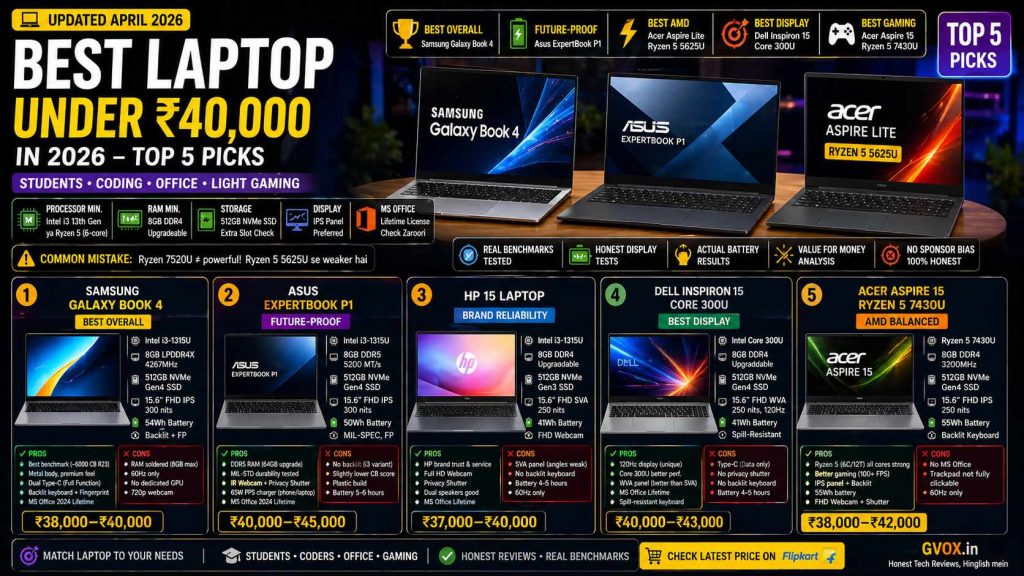
⚠️ Pehle Yeh Samjho — Galat Laptop Mat Khareedna!
Processor Min.
Intel i3 13th Gen ya AMD Ryzen 5 (6-core)
RAM Min.
8GB DDR4 — Upgradeable check karo
Storage
512GB NVMe SSD — Extra slot hona chahiye
Display
IPS Panel preferred — SVA/TN avoid karo
MS Office
Lifetime license check karo — students ke liye zaroori
Common Mistake
Ryzen 7520U ≠ powerful! Ryzen 5 5625U se weaker hai
Bhai ek important baat — sirf processor number dekh ke mat khareedna. Ek dost ne 40,000 mein i3 13th Gen ki jagah i3 12th Gen le liya, sirf is liye ki “13 bada number hai 12 se.” Isi tarah Ryzen 7 5520U ko Ryzen 5 5625U se better samajh liya — yeh galat hai. Aur suno — same processor alag-alag laptops mein alag performance deta hai. Isliye benchmarks compare karna zaroori hai, sirf specs nahi.
01. Samsung Galaxy Book 4 — Best Overall Pick
1
Samsung Galaxy Book 4 — Intel i3 13th Gen 1315U — ₹38,000–₹40,000
🏆 Best Overall
Bhai Galaxy Book 4 is budget mein sabse zyada optimized laptop hai. Pure metal build, fastest RAM frequency, best benchmark scores, backlit keyboard, fingerprint reader, aur MS Office lifetime license — sab kuch ek hi laptop mein. Aur jo cheez sabse unique hai — two fully functional Type-C ports jo display sharing aur power delivery dono karte hain. Is price mein yeh rare hai yaar.
Processor
Intel Core i3-1315U — 13th Gen (2 P-core + 4 E-core, 6 core 8 thread)
RAM
8GB LPDDR4X — 4267 MHz (Soldered, upgrade nahi hoga)
Storage
512GB NVMe Gen4 SSD — Extra slot present (upgradeable)
Display
15.6″ Full HD IPS — 300 nits, 45% NTSC, 60Hz
Graphics
Intel UHD Graphics — GTA5 / Casual games chalenge
Battery
54Wh — 8-10 hours backup (45W fast charger)
Build
Full Metal Body — Premium feel
Extras
Backlit keyboard, fingerprint reader, 720p webcam, Dolby Atmos speakers
MS Office
✅ Home & Student 2024 Lifetime License included
Price
~₹38,000–₹40,000
Cinebench R23 Score — Why Galaxy Book 4 Wins
Is laptop ka Cinebench R23 multi-core score ~6000 aata hai — jo is budget mein sabse zyada hai Intel laptops mein. Yeh isliye hai kyunki Samsung ka overall optimization bahut accha hai, aur RAM frequency (4267 MHz LPDDR4X) bhi sabse zyada hai. Time Spy score (graphical performance) bhi best in class hai is budget mein.
Cinebench R23 Multi-Core~6000 — Best in Class
RAM Frequency (4267 MHz)Fastest at this price
Battery Life54Wh — Best backup
✅ Kya Achha Hai
Full metal build — premium feel ₹40K mein
Best benchmark scores is budget mein (6000+ Cinebench R23)
Dual fully-functional Type-C ports — display sharing + charging dono
IPS panel — colors accurate, wide viewing angles
Backlit keyboard + fingerprint reader — dono saath
MS Office 2024 lifetime license included
54Wh battery — best backup in class, 45W fast charging
❌ Kya Kharaab Hai
RAM soldered hai — 8GB se zyada upgrade nahi hoga kabhi bhi
60Hz display — high refresh rate nahi mila
Intel UHD graphics — dedicated GPU nahi hai
720p webcam — basic quality
⚠️
RAM warning: Bhai agar future mein heavy work karna hai — video editing, multiple VMs, heavy coding — to 8GB RAM pe atka rahega hamesha. Upgrade option nahi hai kyunki soldered hai. Agar future-proofing chahiye to neeche Asus ExpertBook P1 dekho.
02. Asus ExpertBook P1 — Most Future-Proof
2
Asus ExpertBook P1 — Intel i3 13th Gen 1315U — ₹40,000–₹45,000
🔋 Future-Proof Choice
Agar tum soch rahe ho ki “yaar 2 saal baad heavy kaam karunga” — to bhai ye laptop lo. Is budget mein DDR5 RAM, 64GB tak upgrade support, MIL-SPEC durability testing, aur business-grade build quality — yeh sab ek saath sirf ExpertBook P1 mein milta hai. Aur ek aur chiz — 65W PPS adapter (Programmable Power Supply) hai jo tumhare phone aur earphone bhi charge kar sakta hai ek hi charger se.
Processor
Intel Core i3-1315U — 13th Gen (same as Galaxy Book 4)
RAM
8GB DDR5 — 5200 MT/s — Upgradeable up to 64GB!
Storage
512GB NVMe Gen4 SSD — Extra slot present
Display
15.6″ Full HD IPS — 300 nits, 45% NTSC, 60Hz, Anti-Glare
Build
PC+ABS — MIL-SPEC tested (coffee spill, drop, 80kg pressure — sab pass)
Battery
50Wh — 5-6 hours backup (65W PPS charger)
Privacy
IR webcam + Privacy Shutter — business features
Extras
Trackpad mein embedded fingerprint reader, Dolby Atmos speakers
MS Office
✅ Home & Student 2024 Lifetime License included
Price
~₹40,000 (8GB) / ~₹45,000 (16GB variant)
Benchmark Score vs Galaxy Book 4
Yahan ek interesting cheez hai — ExpertBook P1 ka Cinebench R23 multi-core score ~4409 aaya, jabki Galaxy Book 4 ka ~6000+ aaya. Same processor, lekin Samsung ka optimization kaafi better hai. Matlab bhai — processor accha hone se laptop accha nahi ho jaata. Peripherals (RAM type, motherboard, SSD speed) ka bhi bahut bada role hota hai.
Cinebench R23 Multi-Core~4409 — Lower than Galaxy Book 4
RAM Upgrade PotentialUp to 64GB DDR5 — Best in Class
Durability RatingMIL-SPEC Tested — Highest in Segment
💡
Durability test: Is laptop ko properly test kiya — keyboard mein coffee daal diya, drop test kiya, 80kg ka banda bitha diya uske upar. Kuch nahi hua yaar. Agar tumhara laptop college bag mein rough handling se bachna chahiye, to ExpertBook P1 is budget ki best bet hai.
⚠️
i3 variant mein backlit keyboard nahi milta. Agar backlit chahiye to i5 ya i7 variant lena padega. Avnish ne Asus VP ko personally bol diya hai is baare mein — hopefully future units mein aayega.
03. HP 15 — Intel Core i3 1315U — Brand Reliability
3
HP Laptop 15 — Intel Core i3 1315U — ₹37,000–₹40,000
Brand Reliability Pick
HP ka naam sunte hi ghar ke bade log bol dete hain “HP le lo, reliable hai.” Aur baat sahi bhi hai — HP aur Dell ki service aur offline parts availability best hai India mein. Lekin bhai honestly bolunga — HP ka display abhi bhi SVA panel hai jo ek real drawback hai. Colors saamne se theek lagte hain, lekin jaise hi angle badlate ho — color shift ho jaata hai.
Processor
Intel Core i3-1315U — 13th Gen (same chip)
RAM
8GB DDR4 — Upgradeable (extra slot hai)
Storage
512GB NVMe Gen3 SSD — Upgradeable
Display
15.6″ FHD SVA Panel — 250 nits, 48% NTSC, 60Hz ⚠️
Graphics
Intel UHD Graphics — Casual gaming ho jaata hai
Battery
41Wh — 4-5 hours backup (65W charger)
Webcam
Full HD webcam — Privacy Shutter ke saath
MS Office
✅ Home & Student Lifetime License included
Drawback
❌ No backlit keyboard — SVA panel below IPS quality
Price
~₹37,000–₹40,000
🚨
Display issue clearly samjho: SVA panel ka matlab hai — seedha dekho toh colors acche lagte hain, lekin side se dekho toh colors washout ho jaate hain. Students aur working professionals ke liye jo document work karte hain, yeh noticeable hai. IPS panel wale laptops clearly better hain is front pe. HP ko yeh theek karna chahiye yaar.
Achha Kya Hai HP 15 Mein?
HP speakers bahut acche hain — zyada detail ke saath output milta hai competing laptops ke comparison mein. Full HD webcam with privacy shutter ek genuine plus hai. Trackpad bhi improve hua hai — multitasking comfortable hai. Aur service centers aur parts offline market mein sabse easily milte hain HP ke — repair point of view se yeh best hai.
Alternate option: Agar thoda budget stretch ho sake — HP 15 Core 300U le sakte ho. Usme fully functional Type-C port milta hai (display sharing + charging dono) aur i3 13th Gen se better performance milta hai Core 300U mein. ₹3,000–4,000 zyada lagenge lekin worth it hai agar budget allow kare.
04. Dell Inspiron 15 — Core 300U — 120Hz Display!
4
Dell Inspiron 15 — Intel Core 300U — ₹40,000–₹43,000
🖥️ Best Display at This Price
Dell ka yeh laptop ek cheez ke liye alag hai — is price point mein sirf yahi laptop hai jo 120Hz refresh rate deta hai! Baki saare laptops 60Hz pe hain. 120Hz matlab multitasking smooth lagti hai, scrolling mein difference clearly feel hota hai, aur CPU-intensive gaming bhi better experience deta hai. WVA panel IPS ke almost equivalent hai — colors acche hain aur side se bhi zyada shift nahi hota.
Processor
Intel Core 300U — Better performance than i3 1315U
RAM
8GB DDR4 — Upgradeable (extra slot)
Storage
512GB NVMe Gen4 SSD — Upgradeable
Display
15.6″ FHD WVA Panel — 250 nits, 45% NTSC — 120Hz! ⭐
Graphics
Intel UHD Graphics — Casual gaming
Battery
41Wh — 4-5 hours (65W charger)
Keyboard
Spill-resistant keyboard — ❌ No backlit
MS Office
✅ Lifetime License included
Price
~₹40,000–₹43,000 (Back to College offer pe ₹40,000 mil sakta hai)
💡
Core 300U vs i3 1315U: Core 300U mein clock frequency zyada hai i3 13th Gen se, aur benchmarks bhi clearly better hain. Agar Dell wale graph dekho — significant performance difference hai dono processors mein. Aur WVA panel almost IPS level ka experience deta hai in terms of viewing angles.
⚠️
Note karo: Type-C port hai lekin sirf data transfer ke liye — display sharing ya laptop charging Type-C se nahi hogi. Privacy shutter bhi nahi hai webcam mein. Battery bhi zyada nahi hai — heavy use mein 4-5 ghante se zyada expect mat karo.
05. Acer Aspire 15 — Ryzen 5 7430U — AMD ka Best Balanced Laptop
5
Acer Aspire 15 — Ryzen 5 7430U — ₹38,000–₹42,000
⚡ AMD Balanced Pick
Jab bhi kam budget mein acchi performance chahiye — AMD saamne aata hai. Acer Aspire 15 mein Ryzen 5 7430U hai — 6 cores, 12 threads. Aur AMD mein sabhi 6 core powerful hote hain, koi performance/efficiency divide nahi hota Intel jaisa. Gaming bhi Intel se clearly better hai — Valorant mein 100+ FPS easily milte hain full HD low settings pe. Aur GTA5 mein 30-35 FPS comfortable gameplay deta hai.
Processor
AMD Ryzen 5 7430U — 6 core, 12 thread (all powerful cores)
RAM
8GB DDR4 — 3200MHz — Upgradeable up to 32GB
Storage
512GB NVMe Gen4 SSD — Replaceable (upgrade possible)
Display
15.6″ FHD IPS — 250 nits, 45% NTSC, 60Hz, Anti-Glare ✅
Graphics
AMD Radeon Integrated — Better than Intel UHD for gaming
Battery
55Wh — 6-7 hours backup (65W charger, 90 min full charge)
Webcam
Full HD webcam — Privacy shutter included ✅
Keyboard
Backlit keyboard ✅ — Fingerprint reader ❌
MS Office
❌ Not included — separately khareedna padega (₹600–1000)
Price
~₹38,000–₹42,000 (8GB/16GB variants)
Cinebench R23 Multi-Core~6804 — Excellent
Valorant Performance (FHD Low)100+ FPS — Best in Budget
⚠️
Trackpad issue: Acer Aspire 15 ka trackpad fully clickable nahi hai — sirf bottom portion mein right/left click kaam karta hai. Multi-gestures support karta hai lekin full-clickable nahi. Aspire Lite ka trackpad is se better hai. Aur MS Office nahi milta — extra cost dhyan rakho.
06. Acer Aspire Lite — Ryzen 5 5625U — Best Raw CPU Performance
6
Acer Aspire Lite — Ryzen 5 5625U — ₹37,000–₹40,000
🚀 Best Multi-Core CPU Score
Yaar Aspire Lite ka Cinebench R23 multi-core score ~7300+ aata hai — jo is poori list mein sabse zyada hai. Matlab agar pure CPU-heavy kaam chahiye — rendering, compilation, heavy coding — to Aspire Lite wins. Metal body bhi milti hai is mein. Aur IPS panel hai jo Dell ke comparison mein clearly better lagta hai viewing angles ke mamle mein.
Processor
AMD Ryzen 5 5625U — 6 core, 12 thread
RAM
8GB / 16GB variants — DDR4, Upgradeable
Storage
512GB NVMe Gen3 SSD — Upgradeable
Display
15.6″ FHD IPS — 250 nits, 45% NTSC, 60Hz ✅
Build
Metal body — Galaxy Book 4 jaisi premium feel
Battery
41Wh — 4-5 hours only (65W charger)
Trackpad
Fully clickable ✅ — Aspire 15 se better
Keyboard
❌ No backlit keyboard — sticker wala black keyboard
MS Office
❌ Not included — separately lena padega
Price
~₹37,000–₹40,000
Cinebench R23 Multi-Core~7300+ — Highest in List
Battery Life41Wh — Weakest in List
⚠️
Battery problem: 41Wh battery hai — 4-5 ghante se zyada nahi milega. Agar tumhara laptop charging se door rehta hai college mein, to yeh ek real problem hai. Aspire 15 ka 55Wh battery is se kaafi better hai.
07. Benchmark Comparison — Sabka Real Score
Cinebench R23 Multi-Core Score — Real World Performance Comparison
Tested Results
Bhai yeh sabse important section hai. Same processor alag laptops mein alag perform karta hai — yeh table clearly dikhata hai. Sirf specs mat dekho, benchmarks dekho.
| Laptop | Processor | CB R23 Multi-Core | CB R23 Single-Core | Display Panel | Battery | MS Office |
|---|
| Samsung Galaxy Book 4 | Intel i3-1315U | ~6000 ⭐ | ~1800 | IPS — 300 nits | 54Wh | ✅ Free |
| Asus ExpertBook P1 | Intel i3-1315U | ~4409 | ~1700 | IPS — 300 nits | 50Wh | ✅ Free |
| HP 15 Laptop | Intel i3-1315U | ~4500–5000 | ~1700 | SVA — 250 nits ⚠️ | 41Wh | ✅ Free |
| Dell Inspiron 15 | Intel Core 300U | ~5200–5500 | ~1850 | WVA — 120Hz ⭐ | 41Wh | ✅ Free |
| Acer Aspire 15 | Ryzen 5 7430U | ~6804 | ~1365 | IPS — 250 nits | 55Wh | ❌ Extra cost |
| Acer Aspire Lite | Ryzen 5 5625U | ~7300+ 🏆 | ~1400 | IPS — 250 nits | 41Wh | ❌ Extra cost |
📊 Kya Compare Kiya — Intel vs AMD in This Budget
Multi-Core Winner
Aspire Lite Ryzen 5 5625U — 7300+
Best Intel Score
Samsung Galaxy Book 4 — 6000+
Gaming Winner
AMD laptops — Valorant 100+ FPS
Best Battery
Samsung Galaxy Book 4 — 54Wh
Best Display
Dell Inspiron 15 — 120Hz WVA
Most Durable
Asus ExpertBook P1 — MIL-SPEC
🏁 Final Verdict — Apna Use Case Dekho, Tab Lo
🏆 Samsung Galaxy Book 4 — Overall best pick hai. Metal build, best benchmarks, best RAM frequency, backlit keyboard, fingerprint reader, dual functional Type-C ports, aur MS Office — sab kuch. Akela drawback hai ki RAM upgrade nahi hogi. Agar heavy future use nahi hai to blindly yeh lo.
🔋 Asus ExpertBook P1 — Agar future mein heavy kaam ka plan hai — 16GB, 32GB, ya 64GB RAM chahiye padegi — to ExpertBook P1 clear winner hai. MIL-SPEC durability bonus hai. Benchmark thoda lower hai Galaxy Book 4 se, lekin future-proofing mein no competition.
⚡ Acer Aspire Lite (Ryzen 5 5625U) — Pure CPU performance ke liye yeh list mein best hai — 7300+ multi-core score. Metal body, IPS panel, fully clickable trackpad — sab theek hai. Lekin battery 41Wh hi hai aur MS Office nahi milta. Coding-heavy ya rendering kaam ke liye best bet.
🎮 Acer Aspire 15 (Ryzen 5 7430U) — Balanced AMD option. Backlit keyboard hai, IPS panel hai, better battery hai (55Wh), full HD webcam + privacy shutter hai. Gaming ke liye AMD clearly better. Agar MS Office ka kharcha afford karo to yeh accha hai.
HP 15 aur Dell Inspiron 15 — HP aur Dell brand trust ke liye hain. Repair aur parts availability is segment mein best hai inki. Dell ka 120Hz display is price mein unique feature hai. HP ki SVA panel ek genuine drawback hai — lekin service center network strong hai. Brand preference ho to inhe consider karo.
⚡ Quick Decision Table — Koun Sa Lena Hai?
| Agar Tumhara Use Case Hai… | Yeh Laptop Lo |
|---|
| Overall best performance + features ek saath | Samsung Galaxy Book 4 |
| Future mein 16GB+ RAM chahiye padegi | Asus ExpertBook P1 |
| Hardcore coding / rendering / CPU-heavy work | Acer Aspire Lite (Ryzen 5 5625U) |
| Gaming + balanced laptop AMD mein | Acer Aspire 15 (Ryzen 5 7430U) |
| Brand service + offline repair priority | Dell Inspiron 15 ya HP 15 |
| 120Hz smooth display chahiye | Dell Inspiron 15 Core 300U |
| Most durable laptop — abuse bhi sah sake | Asus ExpertBook P1 (MIL-SPEC) |
🔗 Related Articles on Gvox.in
FAQ — Aksar Pooche Jaane Waale Sawaal
2026 mein best laptop under 40000 kaun sa hai? ▼
Overall best hai Samsung Galaxy Book 4 — Cinebench R23 mein 6000+ score, metal build, backlit keyboard, dual functional Type-C ports, aur MS Office lifetime license. Agar future-proof chahiye to Asus ExpertBook P1 le (64GB RAM upgrade supported). Pure AMD performance ke liye Acer Aspire Lite Ryzen 5 5625U sabse aage hai (7300+ multi-core score).
40,000 mein i3 lena chahiye ya Ryzen 5? ▼
Dono choices valid hain alag-alag use cases ke liye. AMD Ryzen 5 (6-core) generally multi-core mein stronger hai aur gaming mein clearly better — Valorant 100+ FPS easily deta hai. Intel i3 1315U ka single-core performance thoda better hai (jo Excel, office work ke liye relevant hai), aur Samsung Galaxy Book 4 jaisa optimized Intel laptop benchmark mein kaafi competitive hai. AMD lo agar gaming priority hai. Intel lo agar ecosystem aur optimization priority hai.
Kya 8GB RAM 2026 mein enough hai? ▼
Basic use ke liye — coding, office, light gaming — 8GB theek hai. Lekin agar tum heavy multitasking, video editing, ya multiple apps simultaneously chalate ho, to 16GB better rahega. Isliye RAM upgradeable hona check karo — Galaxy Book 4 mein RAM soldered hai (8GB fixed), Asus ExpertBook P1 mein 64GB tak upgrade possible hai, Acer laptops mein bhi upgrade hoti hai. Agar heavy future use possible hai to upgradeable choose karo.
IPS panel vs SVA panel — kya fark hai practically? ▼
IPS panel mein wide viewing angles hote hain — side se dekho, ceiling se dekho, koi bhi angle se dekho — colors shift nahi karte. SVA panel mein jaise hi angle change karo, colors washout ho jaate hain. Practically agar tum kisi ko presentation dete ho aur woh side mein baitha hai, ya agar classroom mein side seat hai to SVA panel mein difference clearly dikhta hai. IPS clearly better hai — HP 15 mein SVA panel ek real drawback hai.
MS Office 40000 ke laptops mein included hoti hai? ▼
Samsung Galaxy Book 4, Asus ExpertBook P1, HP 15, aur Dell Inspiron 15 — inke saath MS Office Home & Student 2024 ka lifetime license free milta hai. Acer Aspire 15 aur Acer Aspire Lite mein nahi milta — separately khareedna padega. Third-party resellers se ₹600–1,000 mein legitimate license milta hai. Students ke liye yeh important check hai kyunki directly purchase karo to ₹5,000+ lagta hai.
Ryzen 7 5520U lena chahiye ya Ryzen 5 5625U? ▼
Bhai yeh ek common trap hai! Ryzen 7 5520U sirf 4-core processor hai (lower-end Ryzen 7), jabki Ryzen 5 5625U 6-core processor hai. Performance mein Ryzen 5 5625U clearly jyada acha hai. “7” series ka number hone se automatically better nahi hota. Hamesha cores dekho aur benchmark scores compare karo — sirf generation number ya series number mat dekho.
Laptop ki service aur repair ke liye best brand kaun sa hai India mein? ▼
Dell aur HP ki service center network aur offline spare parts availability best hai India mein. Agar tumhara area tier 2 ya tier 3 city hai, to repair ke time Dell ya HP clearly better option hain. Samsung aur Asus ke service centers bhi hain lekin utne spread nahi hain. Asus ExpertBook P1 business series ka hai to uski support actually consumer series se better hai — lekin overall repair network mein Dell HP win karte hain.