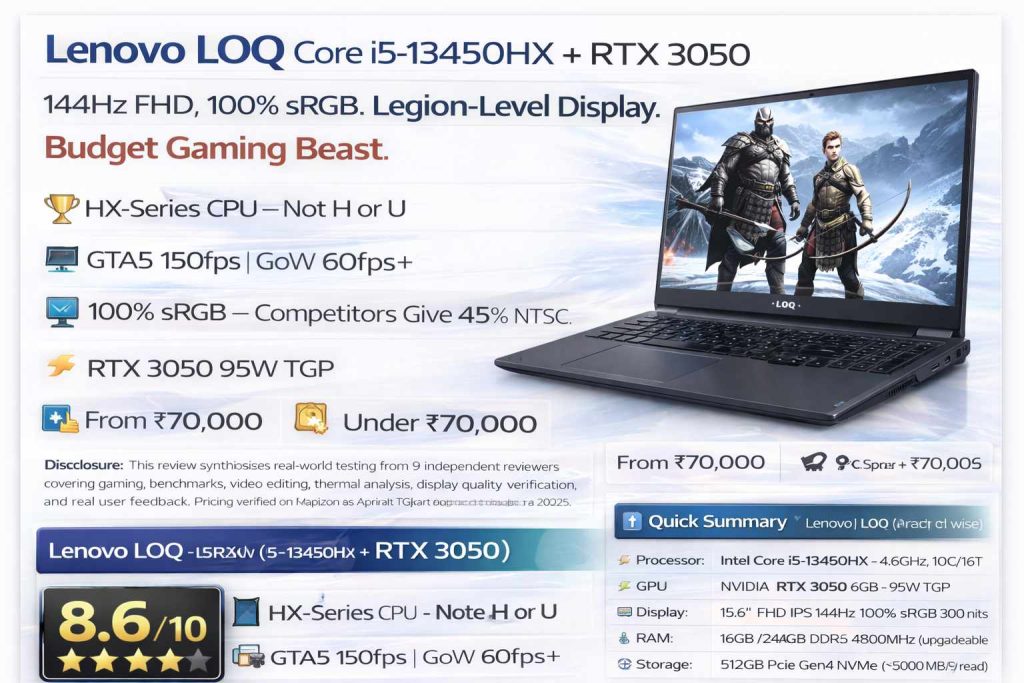
Lenovo LOQ 15IRX9 (i5-13450HX + RTX 3050) — Our Verdict
The Lenovo LOQ 15IRX9 is a strategically clever gaming laptop that wins on CPU performance and display quality in a segment where competitors compromise on both. The i5-13450HX HX processor significantly outperforms H and U-series alternatives at this price. The 100% sRGB display is a premium feature unavailable from competitors under ₹80,000. RTX 3050 at 95W TGP handles most games at 60fps+ on High settings. Excellent for students, content creators, and casual gamers. Battery life is its one genuine weakness — expect 2–3 hours unplugged.
⚡ Quick Summary — Lenovo LOQ 15IRX9 at a Glance
Processor
Intel Core i5-13450HX — 4.6GHz, 10C/16T
GPU
NVIDIA RTX 3050 6GB — 95W TGP
Display
15.6″ FHD IPS 144Hz 100% sRGB 300 nits
RAM
16GB / 24GB DDR5 4800MHz (upgradeable to 32GB)
Storage
512GB PCIe Gen4 NVMe (~5000 MB/s read)
Price Range
₹70,000–₹88,000 (variant wise)
The Lenovo LOQ 15IRX9 makes a very specific value proposition: give me the best CPU at this budget, give me a proper display, and let me game at 60fps+. It delivers all three with surprising consistency. Where it asks for compromise: battery life, colour printing speed (no, wrong product), and absolute GPU muscle for the most demanding AAA titles at ultra settings.
What’s in the Box
📦
Lenovo LOQ 15IRX9 — Unboxing Contents
170W Charger Included
Laptop
Lenovo LOQ 15IRX9 (Luna Grey)
Charger
170W barrel adapter (fast charging)
Power Cable
Premium power cord
Documentation
Quick setup guide + warranty card
Microsoft Office
MS Office Home 2024 lifetime activation
Super Rapid Charge
6% → 80% in ~30 minutes
✅Super Rapid Charge Pro: The 170W charger delivers exceptional charging speeds. From 6% to 80% in approximately 30 minutes. From 0% to 100% in about 60–62 minutes. Even 10 minutes of charging provides a significant battery boost — enough for an emergency top-up. USB-C port also supports up to 140W PD charging.
ℹ️Manufacturing Date Matters: When purchasing, check the manufacturing date on the box. September 2024 or later variants are recommended — earlier batches had some reported motherboard issues that Lenovo addressed in production updates. October 2024 or later is the safest choice.
Design & Build Quality
🔥 LOQ 2024 — Fresh Design Inspired by Legion
The Lenovo LOQ 15IRX9 2024 edition received a significant design overhaul. Luna Grey colour, Legion-inspired aesthetics, LOQ branding on the lid and keyboard deck — it projects a professional-gaming hybrid identity rather than the aggressive RGB gamer look. Side vents have been eliminated in favour of rear exhaust, contributing to cleaner aesthetics and better thermal management.
The Hyper Chamber thermal redesign is the most significant engineering change — an internal chamber architecture with two counter-rotating fans forces hot air out more efficiently than previous LOQ models, delivering approximately 10W more usable performance from the same cooling solution.
🔧
Build Quality — Military Grade, ABS Construction
MIL-STD-810H Certified
Build Material
ABS Polycarbonate (premium finish)
Weight
2.4 kg (laptop only)
With Charger
~3.0 kg total carry weight
Military Standard
MIL-STD-810H certified
Lid
Single-finger open, 180° flat
The polycarbonate build is premium quality — not the cheap plastic found in budget gaming laptops. The LOQ logo on the lid has a distinctive textured feel, and the overall finish gives off a professional-yet-gaming vibe. Lid flex is minimal, keyboard flex is nearly zero. Hinges are solid with no wobble.
⌨️ Keyboard, RGB & Trackpad
The full-size four-zone RGB backlit keyboard includes a dedicated numpad — a practical addition for number-heavy tasks. Key travel is 1.5mm, with a solid, tactile feel. No flex under heavy typing. The four RGB zones are customisable via Lenovo Vantage software or by pressing Fn + Space for quick mode cycling.
A dedicated Copilot key provides instant Microsoft AI assistant access — useful for summarising content, generating text, or controlling system settings through natural language. The trackpad is standard-sized but smooth, supporting all Windows 11 gestures reliably.
✅Performance Mode Switching: Pressing Fn + Q cycles between Quiet, Balanced, and Performance modes — allowing instant adjustment based on task type. In gaming sessions, Performance mode unlocks full GPU TGP. For battery-sensitive work, Quiet/Balanced mode significantly reduces power draw and fan noise.
✅ Design Strengths
- Legion-inspired professional aesthetics
- MIL-STD-810H military grade certified
- Near-zero lid and keyboard flex
- Rear exhaust — no hot air on hands
- Hyper Chamber thermal redesign
- Single-finger lid open, 180° flat
❌ Design Notes
- ABS plastic body (not metal)
- 2.4kg — heavier than thin-and-light
- No fingerprint sensor / face unlock
- 170W charger adds to carry weight
Display — 100% sRGB Analysis
🖥️ 100% sRGB — The Feature That Changes Everything
At ₹70,000–₹80,000, almost every competing gaming laptop — from ASUS TUF, HP Victus, to Acer Nitro — ships with a 45% NTSC display, which translates to roughly 62–65% sRGB. This means washed-out colours, inaccurate colour representation, and an inability to do any serious colour-grading work.
The Lenovo LOQ 15IRX9 ships with 100% sRGB coverage. This single spec puts it in a different class for content creators — colours you see on screen are colours that actually exist in the real world. Video editing, colour grading, photography retouching — all accurate. Gaming visuals are noticeably richer and more immersive.
📺
15.6″ FHD IPS — 144Hz, 300 Nits, G-Sync
100% sRGB | G-Sync
Size
15.6 inches (39.62 cm)
Resolution
1920×1080 (FHD)
Refresh Rate
144Hz (Dynamic: 72Hz/144Hz)
Colour Gamut
100% sRGB / 69% NTSC
Display Output
Direct from RTX 3050 (not iGPU)
The dynamic refresh rate feature automatically switches between 72Hz (battery saving) and 144Hz (performance mode) based on system workload — a battery-conscious design that extends unplugged usage without requiring manual adjustment.
The display is connected directly to the RTX 3050 (not the Intel integrated graphics) — enabling G-Sync for tear-free gaming without compromise. 300 nits is sufficient for indoor environments and good enough for covered outdoor use, though direct sunlight remains challenging as with all 300-nit panels.
✅Competitive Context: At this price range, Lenovo is one of the very few brands offering 100% sRGB in a gaming laptop. ROG Strix, which is Lenovo’s own direct competitor, also offers comparable display quality but at a significantly higher price point. The LOQ gets you Legion-grade display at LOQ price — this is the hidden ace card of this laptop.
Hardware Specs & AI Chip
⚙️
Intel Core i5-13450HX — The HX Advantage
HX > H > P > U Series
Processor
Intel Core i5-13450HX
Cores / Threads
10 Cores (6P+4E) / 16 Threads
Cache
20MB Intel Smart Cache
RAM (16GB variant)
16GB DDR5 4800MHz Dual Channel
RAM (24GB variant)
24GB DDR5 4800MHz
Max RAM
32GB (1 slot empty)
GPU
NVIDIA GeForce RTX 3050 6GB
GPU TGP
95W (full laptop power allocation)
Storage
512GB PCIe Gen4 NVMe (~5000 MB/s)
Extra SSD Slot
✅ Yes — upgradeable to 1TB+
AI Chip
Lenovo LA1 AI Engine Plus
The HX designation is critical to understanding this laptop. Intel’s HX processors are the top-tier mobile CPUs — desktop-class performance in a laptop form factor. HX chips significantly outperform H, P, and U-series processors in multi-threaded workloads, making the i5-13450HX faster than many competing laptops’ i5-13500H or i7-12650H processors in real-world use.
🤖 LA1 AI Engine Plus — Intelligent Performance
Lenovo’s LA1 AI chip is a dedicated hardware chip (not just software) that monitors workload patterns and dynamically adjusts power distribution between CPU and GPU. During gaming sessions, it shifts more power to GPU. During rendering, it prioritises CPU cores. This results in more stable performance consistency, better temperature management, and improved battery efficiency during lighter tasks. It is not marketing — the performance profile difference between AI-optimised and standard mode is measurable, particularly in temperature control during extended gaming.
💡Dynamic Power Sharing: Intel’s architecture allows dynamic power sharing — when only CPU needs peak performance (compiling code, rendering), the GPU reduces power draw so the CPU can boost higher. Conversely during GPU-heavy gaming, the GPU gets its full 95W while the CPU manages efficiently. This is only possible with HX-class chips.
Ports & Connectivity
🔌
Comprehensive Port Layout — All at the Back
140W USB-C PD | HDMI 2.1 8K
Right Side
USB-C 3.2 Gen2 (PD 140W + DP), e-shutter, 3.5mm jack, USB-A 3.2 Gen1
Rear
2× USB-A 3.2 Gen1 (5Gbps), HDMI 2.1, RJ45 LAN, barrel charger
Left Side
Clean — no ports
HDMI Output
8K @ 60Hz capable
USB-C Charging
140W PD max
Rear port placement is a deliberate design choice — cables exit from behind the laptop, keeping both sides of the workspace clean and avoiding accidental disconnections during gaming sessions. The rear port labels are marked on top for easy identification without tilting the laptop.
ℹ️USB-C Flexibility: The USB-C 3.2 Gen 2 port supports DisplayPort output — you can connect a 144Hz external monitor via USB-C. It also supports up to 140W power delivery, meaning a compact USB-C GaN charger (100W tested successfully) can power the laptop in a pinch, though the included 170W barrel charger is needed for maximum gaming performance.
✅Privacy E-Shutter: The physical e-shutter button on the right side electronically cuts the webcam signal — no software or driver involved. This is a more reliable privacy solution than software toggles. For professionals and students in video calls who value hardware-level privacy, this is a meaningful inclusion.
Benchmark Results
📊
Real Benchmark Scores — i5-13450HX + RTX 3050
Best CPU in Price Class
CB R23 Multi
~16,000
Multi-core score
CB R23 Single
~1,660
Single-core score
GB 6 GPU (OpenCL)
~66K
RTX 3050 6GB
3D Mark Time Spy
~6,300
Overall score
PC Mark 10
~6,532
Productivity score
Boot Time
15s
Cold boot to desktop
CPU performance is the standout story. The i5-13450HX’s Cinebench R23 multi-core score of ~16,000 significantly outperforms most i5-H laptops in the ₹70,000–₹80,000 range, many of which deliver 11,000–13,000 multi-core scores. This directly translates to faster rendering, smoother parallel workloads, and better gaming frame rates in CPU-intensive titles.
💡GPU Context: Among 13th Gen i5 variants, the 13450HX is the second-fastest (behind 13500HX). At this price point, no other laptop offers this CPU tier. However, the RTX 3050 6GB GPU delivers expected entry-to-mid-level gaming performance. Benchmark scores clearly show: CPU is a class leader, GPU is competent but not dominant.
Video Editing & Productivity
🎬
Real Editing Tests — Filmora, Premiere Pro, Photoshop
Butter Smooth 1080p & 4K
Premiere Pro FHD
2-min render: 1 min 7 sec ✅
Filmora FHD
2-min render: 51 seconds ✅
4K → 1080p Encode
1-min footage: 30 seconds ✅
4K Editing (Premiere)
Smooth 2-layer 4K timeline ✅
Photoshop
Multi-file, AI tools — smooth ✅
After Effects
Standard compositions — manageable
The combination of i5-13450HX and RTX 3050 makes this one of the most capable editing laptops under ₹80,000. GPU-accelerated rendering in both Filmora and Premiere Pro is genuinely impressive — a 2-minute FHD project rendering in 1 minute 7 seconds (Premiere) and 51 seconds (Filmora) is faster than many laptops with higher-end GPUs due to the strong CPU contribution.
The 100% sRGB display eliminates the biggest frustration of colour work on budget laptops — what you see is what you actually have. No guessing about colour shifts after export. Professional-grade colour grading is possible on this display for FHD deliverables.
✅AI-Powered Editing: In Adobe Premiere Pro, the LA1 AI chip enables accurate auto-scene detection, cutting, and AI background removal noticeably faster than comparable laptops. In Photoshop, Generative Fill and AI-powered content-aware fill process efficiently. For content creators who use Adobe AI tools frequently, this chip adds tangible time savings.
⚠️After Effects & Blender Limitation: Heavy After Effects compositions with complex particle systems and motion graphics — and high-poly Blender renders — will stress the RTX 3050. Entry-level 3D work is manageable. Professional-grade 3D rendering pipelines require RTX 4050 or higher for comfortable workflow.
Gaming Performance — 4 Games Tested
🎮
RTX 3050 6GB at 95W TGP — Gaming Results
FHD High — All Games Tested
| Game | Settings | FPS (Avg) | CPU Temp | GPU Temp | RAM Used | GPU Watt |
|---|
| GTA 5 Enhanced | FHD High | ~150 fps | ~75°C | ~70°C | ~11GB | 90W |
| World War Z | FHD High | 90+ fps | ~85°C | ~75°C | ~12GB | 85W |
| God of War | FHD High | 60+ fps | ~75°C | ~70°C | ~11GB | 95W |
| Call of Duty BO2 | FHD High | 300+ fps | ~75°C | ~65°C | ~7GB | 75W |
Gaming performance at FHD High settings is impressively consistent across all tested titles. The 144Hz display is well-matched to the RTX 3050’s output — most titles deliver well above 60fps, and lighter competitive titles (CoD, Valorant, CS2, Minecraft) run far above the 144Hz limit for the smoothest possible experience.
✅24GB RAM Advantage: The 24GB DDR5 variant is a meaningful upgrade — God of War and World War Z both consume 11–12GB RAM during gameplay, leaving headroom for background processes. The 16GB variant is adequate for most games but leaves less breathing room during simultaneous Discord, Chrome, and streaming scenarios.
⚠️AAA Heavy Titles — Adjust Expectations: Games like Horizon Forbidden West at High settings, RDR2 at Favoured Quality, and Cyberpunk 2077 with ray tracing will require medium-to-low settings for smooth 60fps gameplay. DLSS Quality mode helps significantly (5–10fps improvement on average). The RTX 3050 is an entry GPU — not for maxed-out AAA gaming, but for comfortable 60fps+ at reasonable settings on most titles.
🎯 Competitive Gaming — Where This Laptop Excels
The strong HX CPU delivers exceptional performance in CPU-intensive competitive games. Valorant, CS2, BGMI (Smooth Extreme = 90fps), Minecraft with shaders, Roblox with enhanced graphics — all run exceptionally smooth. For esports-focused gaming, the i5-13450HX + 144Hz display combination is genuinely class-leading at this price.
Thermal Management
🌡️
Hyper Chamber Cooling — Real-World Thermal Analysis
CPU Max 85°C | GPU Max 95°C
Cooling System
Hyper Chamber (dual counter-rotating fans)
CPU Temp Peak
~85°C (sustained gaming)
GPU Temp Peak
~90–95°C (God of War full TGP)
Keyboard Surface
Warm (35–40°C JKL area) — not hot
Room Temp (tested at)
20–29°C ambient
Thermal Throttling
Not observed in any tested game
The 2024 Hyper Chamber redesign delivers measurable improvements over previous LOQ models. By eliminating side vents and concentrating exhaust at the rear, thermal efficiency improves — the rear exhaust handles higher air volume without the heat plume affecting typing hands. Tested across all four games without observing any CPU or GPU thermal throttling.
During God of War (the most demanding test — GPU running at full 95W), CPU temperature peaked at 75°C and GPU at 95°C — both within safe operating limits for gaming laptops. After gaming sessions, the JKL keyboard area reaches 38–40°C (warm but comfortable for continued typing). The W/A/S/D gaming area stays cooler.
💡Summer Use Note: Testing was conducted in 20–29°C ambient temperatures. In summer months (35°C+ ambient), expect CPU temperatures to be 3–5°C higher and GPU 5–7°C higher. Still within safe limits, but Performance mode fans will be audibly louder. iGPU-only mode significantly reduces temperatures during non-gaming use.
Battery & Charging
🔋
60Wh Battery — 2–3 Hours Normal Use
Gaming Laptop Limitation
Normal Use
2–3 hours (60% brightness, YouTube)
iGPU Mode
3+ hours (integrated GPU only)
Heavy Gaming
1–1.5 hours maximum
Charger Wattage
170W barrel (included in box)
6% → 80%
~30 minutes (Super Rapid Charge)
0% → 100%
~60–62 minutes total
USB-C Charging
Up to 140W (tested at 100W — works)
Battery life is the honest weakness of the Lenovo LOQ 15IRX9 — as it is with nearly every gaming laptop in this category. The 60Wh battery provides 2–3 hours of YouTube playback at 60% brightness with keyboard backlight off. Switching to iGPU-only mode in Lenovo Vantage increases this to 3+ hours for office work and browsing.
The silver lining: 170W Super Rapid Charge is exceptional. 10 minutes of charging provides approximately 32–40% battery — enough for hours of lighter use. 30 minutes gets to 80%. For gaming, keep it plugged in — full performance requires the barrel charger. USB-C charging works for lighter productivity tasks.
✅iGPU Mode Battery Strategy: Switching to Hybrid iGPU mode in Lenovo Vantage uses only the Intel integrated graphics for screen output — bypassing the RTX 3050 entirely. Battery life in this mode extends to 3+ hours while maintaining smooth performance for browsing, Office, video calls, and light coding. Toggle back to Performance/Gaming mode when gaming begins.
Lenovo Vantage & Performance Modes
🖥️
Lenovo Vantage — All Controls in One Place
AI-Optimised Modes
🎮
Performance Modes
Quiet, Balanced, Performance. Fn+Q cycles instantly. Performance mode unlocks full 95W GPU TGP for maximum gaming output.
🌈
RGB Keyboard Control
Four-zone RGB customisation with multiple effects. Fn+Space for quick cycling. Full colour and effect control in Vantage.
🖥️
GPU Mode Switch
Hybrid (auto), iGPU Only, dGPU Only. iGPU mode significantly extends battery life for non-gaming use.
⚡
Overclock Options
GPU and RAM overclocking available. Recommended only for experienced users — incorrect values affect stability. Default performance is already well-optimised.
🌐
Network Boost
Prioritise up to 5 applications for network bandwidth — ensures gaming traffic gets first priority over background downloads.
🤖
AI Auto-Optimise
LA1 chip continuously monitors usage patterns and adjusts performance profiles automatically for optimal CPU/GPU power balance.
ℹ️Webcam — 720p with FHD Option: The webcam is 720p in the base configuration. Lenovo VantageApp’s camera enhancement mode boosts output quality. For Teams and Zoom calls, the dual-array microphone picks up voice clearly with reasonable background noise rejection. Privacy shutter physically disconnects the camera for complete hardware-level security.
Full Specifications — Complete Table
| Specification | Lenovo LOQ 15IRX9 (i5-13450HX + RTX 3050) |
|---|
| Model | LOQ 15IRX9 (83DV00BHIN) |
| Processor | Intel Core i5-13450HX (13th Gen HX) |
| Max Clock Speed | 4.6 GHz |
| Cores / Threads | 10 Cores (6P+4E) / 16 Threads |
| CPU Cache | 20MB Intel Smart Cache |
| GPU | NVIDIA GeForce RTX 3050 6GB GDDR6 |
| GPU TGP | 95W (full allocation) |
| GPU Cores | 2,560 CUDA Cores |
| RAM (standard) | 16GB DDR5 4800MHz Dual Channel |
| RAM (premium) | 24GB DDR5 4800MHz |
| Max RAM | 32GB (1 slot empty for upgrade) |
| Storage | 512GB PCIe Gen4 NVMe SSD |
| Extra SSD Slot | ✅ Yes (M.2 slot available) |
| Display | 15.6″ FHD IPS Anti-Glare 144Hz |
| Colour Gamut | 100% sRGB / 69% NTSC |
| Brightness | 300 nits |
| G-Sync | ✅ Supported |
| Dynamic Refresh Rate | 72Hz / 144Hz auto-switching |
| Webcam | 720p HD + dual-array mic |
| Privacy Shutter | ✅ Physical e-shutter button |
| Keyboard | Full-size 4-Zone RGB + Numpad, 1.5mm travel |
| Copilot Key | ✅ Dedicated key |
| AI Chip | Lenovo LA1 AI Engine Plus |
| Cooling | Hyper Chamber — dual counter-rotating fans |
| Wi-Fi | Wi-Fi 6 (802.11ax) |
| Bluetooth | 5.2 |
| LAN | RJ45 Gigabit Ethernet |
| USB-C Port | USB 3.2 Gen2 (PD 140W + DP) |
| USB-A Ports | 3× USB 3.2 Gen1 (5Gbps) |
| HDMI | HDMI 2.1 (8K @ 60Hz) |
| Audio Jack | 3.5mm combo jack |
| Speakers | 2× 2W stereo (bottom-firing) |
| Battery | 60 Wh |
| Charger | 170W barrel (Super Rapid Charge) |
| Charge 6%→80% | ~30 minutes |
| Weight | 2.4 kg (laptop only) |
| Military Standard | MIL-STD-810H |
| OS | Windows 11 Home |
| Office | MS Office Home 2024 (lifetime) |
| LOQ Series Launch | 2023 (LOQ sub-brand under Legion) |
| Price Range | ₹70,000–₹88,000 (variant wise) |
LOQ vs Competitors
| Feature | Lenovo LOQ i5-13450HX + RTX 3050 | Typical Competitor at Same Price |
|---|
| CPU Tier | HX — Top mobile class | H or P series — lower tier |
| Display (Colour) | 100% sRGB | 45% NTSC (~62% sRGB) |
| GPU | RTX 3050 6GB 95W | RTX 4050 (some variants) |
| RAM | DDR5 4800MHz | Often DDR4 or DDR5 |
| AI Chip | LA1 dedicated hardware | Software only |
| MS Office | Lifetime (2024) | Sometimes included |
| Thermal Design | Hyper Chamber 2024 | Standard dual fan |
| Battery | 60Wh (2–3 hrs) | Similar range |
💡RTX 3050 vs RTX 4050 Decision: If gaming at ultra-high settings on AAA titles is your primary goal and you can stretch budget — RTX 4050 variants deserve consideration. But: RTX 4050 versions in this budget typically pair with i5-13500H (lower CPU class) instead of i5-13450HX, and most give you 45% NTSC display. If you value CPU performance + colour-accurate display for editing/content creation + casual-to-mid gaming — LOQ with RTX 3050 + i5-13450HX is the smarter buy.
Price & Variants
💰 Lenovo LOQ 15IRX9 — India Pricing (April 2025)
16GB RAM + 512GB SSD Variant (Win 11 Home)
Amazon / Flipkart — RTX 3050 6GB | i5-13450HX
MRP ~₹88,000
~₹70,000–₹75,000
Sale + Bank Offers
24GB RAM + 512GB SSD Variant (Win 11 Home)
Amazon / Flipkart — RTX 3050 6GB | i5-13450HX
MRP ~₹95,000
~₹78,000–₹88,000
💬 Honest Opinion — After Extensive Real-World Testing
The Lenovo LOQ 15IRX9 with i5-13450HX and RTX 3050 is a laptop that makes bold, correct choices in a market full of compromised laptops. It chose the best possible mobile CPU at its price. It chose 100% sRGB when competitors gave you 45% NTSC. It chose Hyper Chamber cooling when competitors gave you standard dual-fan setups. These aren’t incremental improvements — they’re category-defining advantages.
The HX processor’s performance in CPU-intensive tasks is genuinely remarkable. Premier Pro renders in 67 seconds. Filmora in 51 seconds. 4K encode in 30 seconds. This is performance that belongs in a ₹1.5 lakh workstation laptop — delivered here under ₹80,000. Content creators who have been frustrated by mediocre editing performance on budget gaming laptops will find this transformative.
The one genuine weakness — battery life — is the honest trade-off for all this performance. The HX processor and 95W GPU draw significant power. This is a laptop that lives near a power outlet. But the 170W Super Rapid Charge partially compensates: 30 minutes of charging gives 80% battery for lighter work.
For students, content creators, developers, and casual-to-mid gamers who want the absolute best CPU and display they can get under ₹80,000 — the Lenovo LOQ i5-13450HX is the clear answer.
🎯 Final Verdict — Who Should Buy Lenovo LOQ 15IRX9?
✅
Content Creators: 100% sRGB display for accurate colour work. Premier Pro FHD renders in 67 seconds. 4K editing is smooth with dedicated GPU acceleration. Best value editing-capable gaming laptop under ₹80,000.✅
Students (Engineering/Design/CS): HX processor handles AutoCAD, MATLAB, compilation, and Android emulators with ease. MS Office 2024 lifetime included. Excellent for hostel use with 3+ hours battery in iGPU mode.✅
Competitive Gamers (Valorant, CS2, BGMI): Strong CPU delivers 250–300+ fps in competitive titles. 144Hz display maximises this advantage. G-Sync eliminates screen tearing. Best esports-gaming setup at this price.✅
Casual-to-Mid Gamers: GTA5 at 150fps, God of War at 60fps, World War Z at 90fps — all at FHD High settings. Handles the most popular gaming library comfortably.🤔
Serious AAA Gamers at Ultra Settings: RDR2, Cyberpunk 2077, Horizon FW at ultra settings push the RTX 3050 to its limits. Medium-High settings are more comfortable. If ultra-settings AAA gaming is the primary goal, stretch budget to RTX 4060 variants.❌
Heavy 3D Artists / Blender Power Users: RTX 3050 6GB limits high-poly 3D renders to entry-level complexity. For serious Blender, Cinema 4D, or Houdini work — RTX 4050 or higher is recommended.❌
Users Who Need All-Day Battery: 2–3 hours on battery is a fundamental limitation. If you frequently work away from power outlets for extended periods, a thin-and-light laptop will serve you better.👑
The one-line verdict: Lenovo LOQ i5-13450HX + RTX 3050 is the smartest gaming laptop purchase under ₹80,000 in India — unbeatable CPU, unbeatable display, excellent gaming.
Frequently Asked Questions (FAQ)
What is the price of Lenovo LOQ i5-13450HX RTX 3050 in India?
The 16GB variant is available between ₹70,000–₹75,000 on Amazon/Flipkart with bank offers and sale events (listed MRP ~₹88,000). The 24GB variant ranges from ₹78,000–₹88,000. December 2024 sale prices were as low as ₹66,000–₹70,000 for the base 16GB model.
Can Lenovo LOQ i5-13450HX run GTA 5?
Excellently. GTA 5 Enhanced runs at ~150fps average on FHD High settings. CPU stays at 75°C, GPU at 70°C — perfectly stable. No lag, no frame drops in normal gameplay.
What makes the Lenovo LOQ display special?
The 100% sRGB coverage is the key differentiator. At this price range, all competing laptops (ASUS TUF, HP Victus, Acer Nitro) ship with 45% NTSC displays (~62% sRGB). The LOQ’s colour-accurate display means video editors and designers see true colours on screen — competitors simply cannot match this.
How is Lenovo LOQ for video editing?
Excellent. Premiere Pro: 2-minute FHD project renders in 1 min 7 seconds. Filmora: 51 seconds. 4K→1080p encode: 30 seconds. 4K 2-layer timeline edits smoothly without lag. Photoshop AI tools work efficiently. After Effects handles standard compositions.
What is the battery life of Lenovo LOQ 15IRX9?
2–3 hours during YouTube and normal use (60% brightness, backlight off). In iGPU-only mode: 3+ hours. During gaming: 1–1.5 hours maximum. The 170W charger provides 6%→80% in ~30 minutes — fast enough for quick top-ups.
Should I buy 16GB or 24GB RAM variant?
For gaming + editing: 24GB is the better choice. God of War and World War Z consume 11–12GB RAM during gameplay. With Discord, Chrome, and streaming running simultaneously, 16GB gets tight. If budget is constrained, 16GB is still sufficient for most tasks and the empty RAM slot allows future upgrade to 32GB.
Does Lenovo LOQ support 4K monitor output?
Yes. HDMI 2.1 supports 8K @ 60Hz output. USB-C Gen2 supports DisplayPort output for additional monitor connection. G-Sync is also supported on the internal display via the RTX 3050 direct connection.
Is the Lenovo LOQ RTX 3050 good for BGMI?
Excellent. BGMI runs at Smooth + Extreme (90fps) settings consistently. The HX processor delivers very stable frame rates in this CPU-intensive title. Temperatures remain controlled throughout extended BGMI sessions.
Should I buy LOQ RTX 3050 or RTX 4050?
RTX 3050 (this laptop): Choose if CPU performance + colour-accurate display + editing capability matter alongside gaming. RTX 4050: Choose if maximum gaming FPS in AAA titles is your only goal and you don’t need the HX-class CPU. Note: most RTX 4050 variants in this budget pair with lower H-series processors and 45% NTSC displays.
Does Lenovo LOQ 15IRX9 overheat?
No. The Hyper Chamber dual-fan rear exhaust system keeps CPU below 85°C and GPU below 95°C across all tested games. No thermal throttling was observed. The 2024 redesign improved thermal efficiency by approximately 10W over previous LOQ models. Keyboard surface stays warm, not uncomfortably hot.
What ports does Lenovo LOQ 15IRX9 have?
Right: USB-C 3.2 Gen2 (140W PD + DP), camera e-shutter, 3.5mm audio, USB-A 3.2 Gen1. Rear: 2× USB-A 3.2 Gen1, HDMI 2.1 (8K 60Hz), RJ45 Ethernet, barrel charging. Left: clean, no ports.
🌐 Official Website: Gvox.in →
📌 Sources: This review synthesises 9 independent reviewer experiences including gaming tests (GTA5, God of War, World War Z, CoD BO2, Valorant, CS2, RDR2, Cyberpunk 2077), benchmark runs (CB R23, 3D Mark, PC Mark 10, GB6, Heaven Benchmark), video editing tests (Premiere Pro, Filmora, After Effects, Photoshop), thermal monitoring, battery drain tests, and real Amazon customer feedback over 4+ months of ownership.
For more gaming laptop reviews, visit Gvox.in.